5 Best Scan Tool Under $100 In 2026
As an Amazon Associate we earn from qualifying purchases.
Many drivers want to know why the check engine light is on without paying for a shop visit each time. A scan tool, also called a car code reader, can help with that. This guide looks at the best scan tool under $100 for people who are new to car diagnostics, and it compares five popular OBD2 scanners.
Each product here plugs into the car’s OBD2 port, which is the connector most vehicles from the mid-1990s onward use to share engine information. All five read diagnostic trouble codes and clear them, and most also show live data and readiness status.
The comparison below rests on the listed features and typical use, not on personal testing, so it describes what buyers can expect rather than hands-on results. Keep in mind that a code tells you which system reported a fault, not always the exact part that failed.

1. ANCEL AD310 Classic Enhanced Universal OBD II: best for simple code reading
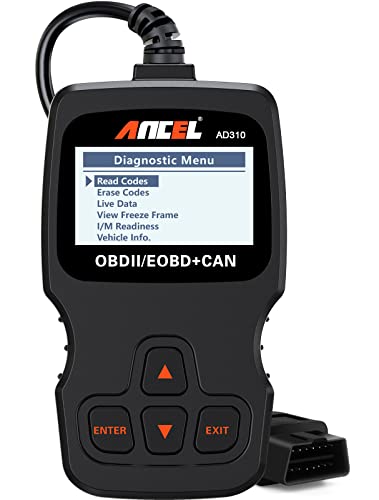
The ANCEL AD310 is a compact, low-cost code reader built for drivers who mainly want to read and clear engine codes. It is a good fit for someone who wants a basic tool to keep in the glovebox or on the dashboard. The product listing describes it as a well-known OBD2 scanner in its category.
The unit covers emission-related trouble codes, which are the codes that usually turn on the check engine light. It can also show live data, freeze frame information and readiness monitor status. Freeze frame is a snapshot of sensor values saved when a fault was logged, and it can help show the conditions under which the problem happened, such as engine speed or temperature.
Key features in plain words
The AD310 gets its power straight from the car’s port, so it needs no batteries or charger. Its cable is listed at about 2.5 feet and built with thick, flexible insulation. The screen and labelled buttons are described as easy to read, which matters when you are checking a dashboard in dim light.
It supports several OBD2 communication protocols, which are the languages cars use to talk to scanners. The listing says it works with many 1996 US-based cars and 2000 EU-based and Asian models, plus newer vehicles. Buyers should check compatibility with their specific make, model and year before buying, since port-based tools can still behave differently across vehicles.
Day-to-day use
In practice, using the AD310 means plugging it in, turning the ignition on and waiting for the menu. The buttons are simple, so most people can read a code and look up its meaning within a few minutes. Because it weighs about 12 ounces, carrying it around is easy, if you keep it in the car or take it to a friend’s vehicle.
A typical routine is to read the code, write it down, and then search that code alongside your make and model. Many codes point to a range of possible causes, such as a loose gas cap or a failing oxygen sensor, so the code is a starting point rather than a final answer. Clearing the code without fixing the cause usually means the light returns.
Its limit is scope. The listing states that it only reads emission-related codes, so problems with the ABS, airbags or transmission will not show up. For those systems, a different tool is needed.
Performance and ease of use
The AD310 is designed for quick code reads rather than deep diagnostics. The product listing describes its results as fast and accurate for the emission system. Beginners generally find the interface straightforward, because it does not require a smartphone, Bluetooth pairing or account setup.
Value for money
At its listed price, the AD310 is one of the lowest-cost options in this round-up. For a driver who only needs to read and clear engine codes, it offers good basic value. Those who want more systems covered, or who prefer to view data on a phone, will likely need to spend more.
Pros
- Very affordable and compact
- No batteries or app needed
- Reads, clears and explains emission codes
- Simple buttons and clear screen
Cons
- Covers emission codes only, not ABS, airbag or transmission
- Does not work with OBD1 interfaces
- Compatibility should be checked before buying
2. ANCEL AD410 Enhanced OBD2 Scanner: best for live data on a budget
The ANCEL AD410 is a step up from the AD310 for drivers who want more detail about how the engine is running. It still uses a simple design with no app or Bluetooth. It suits everyday drivers and home users who like to look at more than one number at a time.
The listing says the AD410 includes a built-in library of definitions and covers a wide range of OBD2 functions. Those functions include reading and clearing codes and viewing live data readings. For many buyers, the extra detail is the main reason to pick this model over the AD310. A driver who only wants to clear a warning light may find the step-up features more than they need.
Key features in plain words
The AD410 lists more than 42,000 built-in code lookups, which helps when a code is unfamiliar. Live data shows values such as engine speed, coolant temperature and fuel trim while the engine runs. Fuel trim is a measure of how the engine adjusts its fuel mix. A steady reading is generally a sign that the adjustment is working within its normal range.
It also offers an O2 sensor test, an EVAP test and readiness checks. The readiness check is useful before an emissions inspection, because some monitors must finish before a car can pass. The display is a 2.4-inch color screen with a menu that is described as intuitive. A color screen can make it easier to spot which values are changing and which stay flat.
Day-to-day use
Daily use is similar to the AD310, with a few more menu options. A driver might check live data during a short drive to see if readings look steady. Because the unit draws power from the port, it stays ready without charging. Users should still keep it in a safe place so the cable does not get tangled near the pedals.
The listing mentions multilingual support, which can help households where English is not the first language. Clear on-screen definitions also reduce the need to search online for each code. Owners who check their car once a month often find this quicker than looking up codes on a phone.
Performance and ease of use
The AD410 covers more functions than a basic reader, so the menus take a little longer to learn. Beginners who work through the options one at a time usually find the layout logical. The color display makes live data easier to follow than a plain screen would. Reading the included instructions before the first scan can save time later.
Value for money
The AD410 costs more than the AD310 but adds live data and readiness testing. For buyers who want a little more insight without a phone app, that extra cost can make sense. Those who only need to clear codes may find the AD310 enough. Comparing the two features list against personal needs is the simplest way to decide.
Pros
- Live data and readiness checks in one simple unit
- Large built-in code library with on-screen definitions
- No app, Bluetooth or charging needed
- Multilingual menus
Cons
- Costs more than the basic AD310
- Menus have more options to learn for absolute beginners
- Still limited to OBD2 systems, so ABS and airbag codes may not be covered
3. BlueDriver OBD2 Scanner Bluetooth: best for detailed repair reports
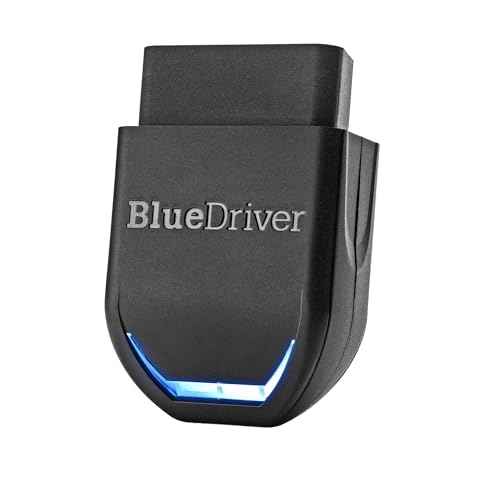
The BlueDriver is a Bluetooth scanner that works with a phone or tablet. It is designed for people who want more than a code number and would like a written explanation of likely causes. It is the most expensive option in this round-up, and it sits right at the top of the budget.
The listing describes coverage of systems beyond the engine, including ABS, airbags, TPMS and transmission on supported vehicles. TPMS means the tire pressure monitoring system. The product also states that it works with gas vehicles from 1996 onward and several light-duty trucks.
Coverage matters because a basic reader may only show engine codes. A scanner that also reads the brake or airbag system can help you see if a warning light comes from a different part of the car. Check the listing against your own vehicle before you buy.
Key features in plain words
The scanner plugs into the port and connects wirelessly to a phone app. Because the screen is on the phone, the hardware itself is small and needs no cables to a separate display. Users can view live data while driving, save freeze frames and check smog readiness.
A freeze frame is a snapshot of sensor readings taken when a fault was recorded. It can help you see the conditions that triggered the code, such as engine speed or temperature. Smog readiness shows if the car’s emissions monitors have finished their self-checks, which can matter before an emissions test.
The listing also describes repair reports matched to a vehicle’s identification number, with definitions, possible causes and confirmed fixes. It states there is no subscription for these reports. Buyers should confirm which features apply to their specific car, as coverage varies by make and model.
Day-to-day use
Using the BlueDriver usually means opening the app after plugging in the scanner. Some people prefer reading results on a larger screen, while others enjoy the written explanations. The app also makes it easy to keep records of past scans.
Saved scan records can be useful if you want to compare results over several visits to a mechanic or track if a problem returns after a repair. Keeping a short note with each scan, such as the mileage and what you did before the light came on, adds useful context.
Because it depends on a phone, a dead phone battery or a weak Bluetooth connection can interrupt a scan. That is a trade-off for the larger display and richer reports.
Performance and ease of use
The BlueDriver offers the widest range of systems in this round-up, based on its listing. Its app presents information in a clear, step-by-step style that many beginners find helpful. Some functions take a little practice to find within the app.
New users may want to spend a few minutes browsing the menus before they need the tool in a hurry. Learning where the code lookup, live data and saved reports sit can make a roadside check much less stressful.
Value for money
At its listed price, the BlueDriver is the most costly option here, but its broader system coverage and written repair reports set it apart from the basic readers. Buyers who mainly want to clear engine codes may find the price hard to justify. Those who want a fuller picture of their vehicle may see the added cost as reasonable.
A simple way to judge the price is to ask how often you expect to scan your car and how much you value a written explanation. Frequent drivers, or people who want to understand repair quotes, are more likely to get full use from the extra features.
Pros
- Covers more systems than the basic readers, based on the listing
- Detailed written reports matched to the vehicle
- Works with a phone or tablet for a large, familiar display
- No subscription stated for repair reports
Cons
- Highest price in this round-up
- Requires a phone or tablet and a working Bluetooth connection
- Some features depend on vehicle make and model
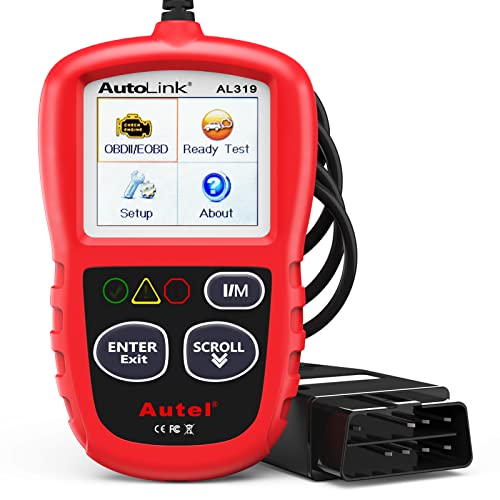
4. Autel AL319 Professional OBD2 Scanner: best for a straightforward check engine fix
The Autel AL319 is a plug-and-play reader aimed at car owners who want a clear path from warning light to answer. It does not need a phone or batteries. It suits drivers who want a tool they can use on their own without much setup.
The listing says the AL319 reads and clears codes, shows live data and freeze frame, and checks readiness status. It also states that it supports several languages and a range of vehicles from 1996 onward. The manufacturer offers a limited warranty and free updates, according to the listing.
Freeze frame is a snapshot of sensor readings saved when a fault was first recorded. It can help show the conditions under which the problem happened. Live data shows sensor readings in real time, which can help you watch how the engine responds while it runs.
Key features in plain words
The AL319 has a color screen, a built-in speaker and an LED indicator. The listing describes a one-click readiness check, which can speed up the process before an inspection. The cable is described as long enough to reach the port without getting in the way.
It supports the major OBD2 protocols, so it can talk to many common cars. As with any scanner, compatibility should be confirmed for a specific vehicle. The warranty period listed is twelve months from purchase.
A readiness check reports if the car’s self-tests have finished. Some emissions tests will not run until these tests are complete. Clearing codes resets the stored fault, but it does not repair the cause, so the light may return if the problem remains.
Day-to-day use
Using the AL319 is a matter of plugging in, turning the key and following the on-screen menu. The one-click readiness check is handy for drivers preparing for an emissions test. Most users will use it occasionally rather than every day.
Its built-in speaker can give a simple audible cue, which some drivers find helpful while working under the dashboard. It is a practical feature for hands-on use.
A common routine is to read the code, write it down, look up what it means for your model, and then decide on next steps. Keeping a note of codes and dates helps you spot patterns if a fault comes back.
Performance and ease of use
The AL319 is built around a simple, direct workflow. The listing presents it as suitable for people with little mechanical background. Its menus are less detailed than a full diagnostic tool, which keeps it easy to follow.
The trade-off is depth. A basic reader shows what the engine system reports, but it does not offer the advanced functions that some professional tools provide. For a first scanner, that simplicity is often an advantage.
Value for money
The AL319 sits in the middle of the price range and includes a warranty and free updates in its listing. For buyers who want a dependable reader with a clear display and a warranty, it offers solid value. Those who want wider system coverage will need a different tool.
Before buying, check the current price and the included items on the seller’s page, since these can change. Comparing the warranty terms across sellers can also help you decide.
Pros
- Plug-and-play with no batteries or app
- Color screen, speaker and one-click readiness check
- Warranty and free updates stated in the listing
- Supports many languages
Cons
- Covers mainly engine and emission systems
- Less detailed than app-based tools
- Compatibility should be checked for each vehicle
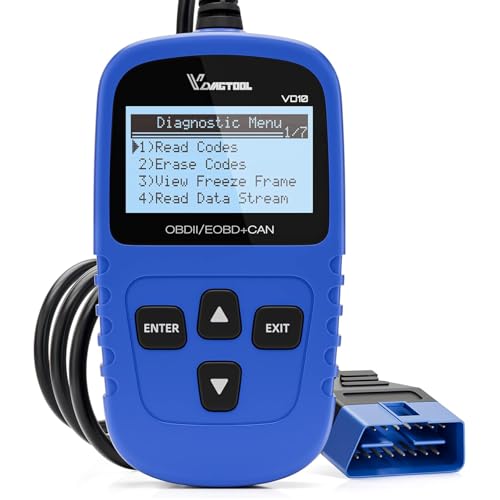
5. VDIAGTOOL VD10 OBD2 Scanner Check Engine Code: best for budget readiness checks
The VDIAGTOOL VD10 is the lowest-priced scanner in this round-up. It is a handheld reader that covers the core functions most beginners need. It suits a driver who wants a simple tool for reading codes and checking readiness on a tight budget.
The listing describes a built-in database of more than 3,000 codes, live data, freeze frame and readiness checks. It also states that it reads generic and manufacturer-specific codes, along with pending codes. Pending codes are faults the car has noticed but not yet confirmed. A pending code can be an early warning, so it is worth checking even when the check engine light is off.
Key features in plain words
The VD10 has a TFT color screen that displays code definitions instantly after a scan. A driver who sees a code such as P0420 can read a plain description on the screen without searching for it elsewhere. The listing says it supports all OBDII protocols, including CAN, ISO9141, KWP2000, J1850 PWM and J1850 VPW. It is also described as compatible with a large share of OBDII-compliant vehicles.
Vehicle identification data is another listed feature. The VD10 can show details such as the VIN, calibration IDs and calibration verification numbers. These can be useful when checking if a used car’s computer matches its records. A buyer might compare the displayed VIN with the one on the dashboard or registration papers as a simple first check.
Day-to-day use
Using the VD10 is simple. A driver attaches it to the port, usually located under the dashboard near the steering column, then reads the codes and checks the definitions on screen. The readiness function can be run before an inspection to see if the required monitors are complete. Incomplete monitors are a common reason a car fails an emissions test, even when no warning light is on.
Because it is handheld with no app, it works on its own without a phone. Its small size makes it easy to store in a glove box or a bag. Those who need to read codes from several vehicles will find the process repeats quickly, since the steps stay the same from car to car.
Performance and ease of use
The VD10 covers the essentials with a straightforward layout. Beginners can work through the menus without much training. Its feature list is shorter than the BlueDriver’s, so there is less to learn. That simplicity is a benefit for someone who only needs to check a light and understand the basic cause.
Value for money
The VD10 has the lowest price in this round-up and still lists live data, readiness checks and a large code database. For a driver who wants basic functions on a small budget, it offers strong value. Those who want repair reports or wider system coverage will need to spend more. A useful test is to ask if the tool will be used often enough to justify a larger purchase.
Pros
- Lowest price in this round-up
- Large built-in code database with on-screen definitions
- Live data, freeze frame and readiness checks
- Reads vehicle identification information
Cons
- Covers mainly engine and emission systems
- Fewer advanced features than app-based tools
- Compatibility should be confirmed before buying
Comparison insights: how the five scanners differ
The five scanners share a core purpose but differ in depth and convenience. Each one reads diagnostic trouble codes, which tell you why a warning light is on. The AD310 and VD10 are the simplest and least costly. The AD410 and AL319 sit in the middle with more menus or a warranty. The BlueDriver is the most capable but depends on a phone.
On performance, the BlueDriver’s listing describes the widest system coverage. The AD410 and VD10 offer more live data than the AD310. The AL319 focuses on a clean, direct workflow. Each tool does its main job well within its scope.
Ease of use depends on the buyer. Plug-and-play units such as the AD310 and AL319 need no setup. The BlueDriver asks for a phone and an app, which some beginners find easy and others find extra work. The AD410 and VD10 fall between these two approaches. A person who dislikes managing apps will likely prefer a standalone unit.
Value for money depends on what a driver needs. A basic code reader is inexpensive, while a tool with repair reports costs more. In practice, buyers should match the price to the systems they expect to check. Paying for coverage you never use adds cost without adding benefit.
Buying guide: key factors explained in plain words
The most important factor is which systems the scanner can read. Engine and emission codes are the most common, and most tools cover them. ABS, airbag and transmission codes need a tool with wider coverage. If a fault lives in a system your scanner cannot reach, you will see no code at all.
Compatibility matters just as much. Most scanners list the years and regions they support. Checking the listing against the car’s make, model and year before buying prevents wasted money. Pay attention to if a listing mentions specific systems, since general claims can hide gaps.
Live data is useful for watching how sensors behave while the engine runs. For example, you can watch coolant temperature climb to normal operating range or see if an oxygen sensor responds. Freeze frame stores a snapshot of conditions when a fault occurs, which helps you find out what was happening at the time. Readiness checks show if the car’s monitors are complete before an inspection.
Power and connection style also affect daily use. Some scanners draw power from the port and need no batteries. Others depend on a phone and Bluetooth. Consider which setup suits your habits, and if you want to keep a phone connected in the car.
Finally, look at the warranty and update policy. Some listings mention a warranty period or free updates. These details can affect long-term value, so read them carefully and check what the seller actually promises. Updates matter most for newer vehicles, whose codes may not appear in an older library.
Who should buy these products: matching buyers to a scanner
A driver who only wants to read and clear a check engine light should look at the AD310. It is compact and inexpensive. It handles the most common job without extra complexity. Someone who checks the car once in a while will likely find it sufficient.
A hands-on owner who wants live data and readiness checks without a phone should consider the AD410. Its color screen and built-in definitions make it easier to understand what the engine is doing. It stays simple to use while adding more detail. This suits someone who likes to monitor the car before or after a repair.
A driver who prefers a large display and detailed written reports may prefer the BlueDriver. It suits people who are comfortable using a phone app and want more than a code number. It is the priciest option, so it fits buyers who will use those extra features. Those who only need a code reading will pay for capability they never touch.
A car owner who wants a straightforward tool with a warranty and a clear screen could look at the AL319. It works without a phone and supports a range of vehicles. Its focus on the engine makes it a practical choice for everyday checks. It is a good fit for an owner who wants a dedicated device kept in the glovebox.
A buyer on a tight budget who still wants live data and readiness checks may find the VD10 useful. It offers a large code library and vehicle identification details at the lowest price here. Those who need wider system coverage will need a different tool. Always confirm the systems it reads before you buy.
Final verdict: which scanner makes the most sense
No single scanner is the right choice for everyone. The best pick depends on the systems a driver wants to check, how comfortable they are with a phone, and how much they plan to spend. Each product in this round-up does its main job within its stated scope.
For a simple, low-cost reader, the AD310 and VD10 stand out. For more live data without a phone, the AD410 is a sensible middle choice. For detailed reports and wider coverage, the BlueDriver is the most capable option, though it costs the most.
The AL319 suits buyers who want a clean, warrantied tool for everyday engine checks.
Frequently Asked Questions
What does an OBD2 scanner do?
An OBD2 scanner connects to the port under the dashboard and reads diagnostic trouble codes from the car’s computer. It can also clear codes after a repair.
Many models show live data and readiness status as well.
Will a scanner tell me exactly what to fix?
A scanner gives a code and, on many models, a short definition. The code points to a system or sensor, but it does not always name the exact part. A mechanic or repair guide may still be needed to confirm the fix.
Can these scanners read ABS or airbag codes?
Coverage varies by product. Most basic readers in this round-up focus on engine and emission codes. The BlueDriver’s listing describes wider system coverage on supported vehicles, so buyers should check that list.
Do I need a phone to use a scanner?
Not for every model. The AD310, AD410, AL319 and VD10 work on their own screens with no phone. The BlueDriver depends on a phone or tablet app.
Is a cheap scanner good enough for a beginner?
For reading and clearing engine codes, a basic scanner is often enough. Beginners should confirm compatibility with their car first. As needs grow, a tool with more features may be worth considering.

Peterson is an automotive enthusiast and auto parts reviewer with a passion for vehicle maintenance, upgrades, and performance. He enjoys researching and testing car parts, tools, and accessories to help drivers make informed buying decisions. Through AutoPartsTalk.com, Peterson shares honest reviews, practical maintenance tips, and expert guides to keep vehicles running safely and efficiently.