4 Best OBD2 Scanner Picks In 2026
If your check engine light just turned on and your stomach dropped a little, you are not alone. That tiny orange light can mean something small like a loose gas cap, or something bigger like a failing sensor. The only real way to know for sure is to plug in an OBD2 scanner and read the actual code your car is throwing.
The good news is that you don’t need a mechanic’s toolbox or a fat wallet to do this at home. A decent OBD2 scanner costs less than an oil change at most shops, and it pays for itself the very first time it saves you a diagnostic fee.
In this roundup, we’re going hands-on (in spirit) with four of the most talked-about scanners on the market right now: the BlueDriver Bluetooth Scanner, the Innova 5610 Bidirectional Scan Tool, the BLCKTEC 440 Bluetooth Scanner, and the Innova 1000 Bluetooth Scanner. Each one has a different price point, a different skill level it’s built for, and a different set of features that matter once you actually plug it into your dashboard.
We’ll walk through what each tool does well, where it falls short, who it’s actually built for, and how to avoid the common traps people fall into when shopping for a scan tool. By the end, you should have a clear idea of which scanner fits your car, your budget, and your comfort level with wrenches.
Let’s get into it.
Why an OBD2 Scanner Matters More Than You Think
Every car built after 1996 in the US comes with an OBD2 port, usually tucked under the steering wheel. This port talks to your car’s onboard computer, and that computer is constantly logging information about your engine, transmission, brakes, airbags, and more.
When something goes wrong, the computer stores a trouble code. Without a scanner, that code just sits there, invisible to you, until a mechanic plugs in their own tool and charges you a diagnostic fee to tell you what it means. With your own scanner, you skip that step entirely. You read the code yourself, look up what it means, and decide if it’s a five-minute fix or a trip to the shop.
This is especially handy for used car buyers too. Plugging a scanner into a car before you buy it can reveal hidden problems a seller cleared right before the test drive, since some issues come right back after a short drive cycle.
A scanner also helps you avoid unnecessary repairs. Shops don’t always act in bad faith, but sometimes a code gets misread or a part gets replaced that wasn’t actually the problem. When you can read the code yourself and do a bit of research, you walk into the shop with more confidence and fewer surprises on the final bill.
Now let’s look at each scanner in detail.
1. BlueDriver Bluetooth Pro OBD2 Scanner
Product Overview
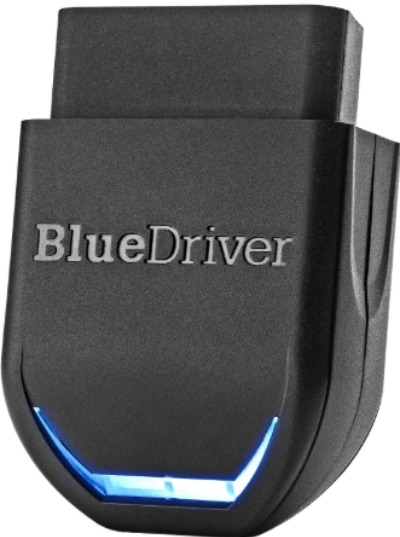
BlueDriver has built a strong name for itself in the DIY diagnostic space, and it’s usually the first name that comes up when people ask for a scanner recommendation online. This is a Bluetooth-based dongle that plugs into your OBD2 port and pairs with a free app on your phone. There’s no subscription fee, no monthly charge, and no login wall standing between you and your car’s data.
It reads and clears codes for the engine, transmission, ABS (anti-lock braking system), SRS (airbag system), and TPMS (tire pressure monitoring system) on most vehicles made after 1996. That’s a much wider net than basic code readers, which usually only touch the engine light.
Best Use Cases
This tool shines for owners who want a genuine diagnostic experience without opening their wallet every time they connect. It’s a great pick if you:
- Want to read and understand ABS or airbag codes, not just the check engine light
- Plan on buying a used car and want to run a pre-purchase inspection
- Like having a repair report you can hand to a mechanic or print out
- Want live data streaming to watch sensor readings in real time
Key Features Explained Simply
- Multi-system scanning: Most cheap scanners only read engine codes. BlueDriver also reads ABS, SRS, and TPMS codes, so a warning light on your dash for brakes or airbags won’t leave you guessing.
- Repair reports: After a scan, the app builds a summary that lists the code, a plain language explanation, possible causes, and even notes from other owners who had the same code on a similar car. This turns a cryptic five-digit code into something you can actually act on.
- Freeze frame data: This shows what your engine was doing the moment the code got triggered, like RPM, speed, and coolant temperature. It helps narrow down whether a problem happens at idle, at speed, or under load.
- Mode 6 data: This is a more advanced diagnostic mode that shows pass/fail results for emissions-related tests your car runs in the background. Not every driver needs this, but it’s a nice bonus for people chasing a stubborn check engine light.
Real-Life Usage Insight
A common scenario people run into with this scanner is a check engine light that comes on after filling up gas, or right after a battery replacement. In both cases, the code often points to something small like an evaporative emissions leak or a system that just needs to relearn itself. Being able to read the exact code and clear it yourself, instead of paying a shop thirty minutes of labor for the same task, is where this scanner earns its price back quickly.
Another common use case is pre-purchase car inspections. Buyers connect the scanner in a parking lot before signing paperwork, checking for pending codes or a scan history that shows the seller cleared codes recently. That single check has saved plenty of buyers from driving home a car with a hidden transmission issue.
Pros
- Reads engine, ABS, SRS, and TPMS codes on most vehicles
- No subscription or account required to use core features
- App gives plain-language explanations instead of just code numbers
- Repair reports are genuinely useful for DIY research
- Works over Bluetooth so there’s no cord tangled under your dash
- Regular software updates keep the code database current
Cons
- Priced higher than basic code readers, which can feel steep for someone who only wants to clear a check engine light
- Requires a phone or tablet to function, since there’s no standalone screen
- Bidirectional testing (actively commanding components) is limited compared to professional-grade tools
- Some older or less common vehicle makes may show incomplete ABS or SRS support
Performance Discussion
Connection speed is quick, and the app rarely lags once paired. Code lookups are fast, and the explanations load without needing a constant internet connection for the basics, though the deeper repair report library does need a connection. Coverage for domestic and Asian imports tends to be more complete than for some European models, which is worth knowing if you drive a less common European car.
Ease of Use
The setup process is about as simple as it gets: plug the dongle into the OBD2 port, open the app, tap connect, and you’re reading codes within a minute or two. The interface avoids technical jargon where it can, which makes it approachable for someone who has never touched a scan tool before.
Value for Money
Given the multi-system scanning and lack of subscription fees, this tool holds its value well over time. A single diagnostic visit to a shop can cost as much as this scanner, so if you plan on owning your car for years, the math works out in your favor fast.
2. Innova 5610 OBD2 Bidirectional Scan Tool
Product Overview
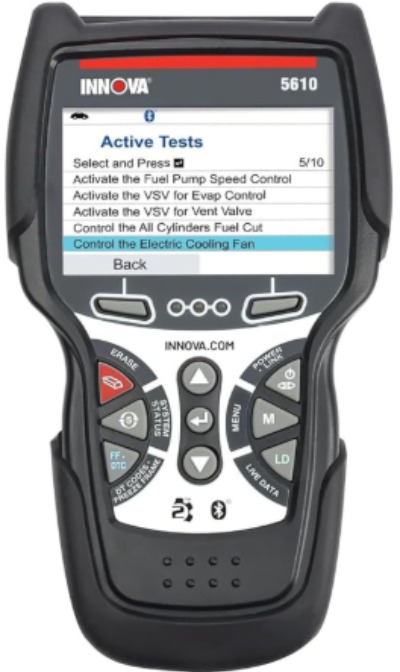
The Innova 5610 sits a notch above basic code readers, and it’s built for someone who wants to go beyond just reading codes and start actively testing and resetting systems. It’s a handheld unit with its own screen, so you don’t need to rely on a phone app to see your results. It also includes bidirectional control, which means it can send commands to certain components, not just read data from them.
Best Use Cases
This tool fits well for:
- DIY mechanics who want to do more than read codes, like testing an ABS pump or cycling a solenoid
- Owners who prefer a dedicated handheld device over a phone-based app
- People who want US-based technical support on the phone when they hit a confusing code
- Drivers who want ongoing software updates included without paying extra later
Key Features Explained Simply
- Bidirectional testing: Instead of only reading information, this tool can send commands to parts like the ABS module or fuel pump to see if they respond correctly. This is closer to what a shop-level scanner does, and it helps confirm a part is actually broken instead of guessing based on a code alone.
- Standalone screen: No pairing with a phone needed. You get a built-in display, which some people prefer since it avoids app updates or Bluetooth pairing hiccups.
- Free updates: The tool includes software updates so your code database stays current as new vehicle models are added, without a recurring subscription charge.
- US-based support: If you’re stuck interpreting a strange code, you can call a support line staffed by people who actually understand the tool and cars in general, rather than digging through forums for answers.
Real-Life Usage Insight
A typical situation where this tool proves its worth is troubleshooting an ABS warning light. A basic reader might just say “ABS system fault,” but with bidirectional testing, you can actually command the ABS pump to cycle and listen or watch for a response. If nothing happens, that narrows the problem down to the pump or its wiring instead of leaving you to replace parts on a guess.
It’s also handy after replacing a battery or doing brake work, since some vehicles need a manual “bleed” procedure for the ABS system that a bidirectional tool can help trigger.
Pros
- Handheld design with its own screen, no phone required
- Bidirectional controls go beyond basic code reading
- Free lifetime-style updates included in the purchase price
- Real phone support based in the US
- Solid build quality that feels durable for garage use
Cons
- Learning curve is steeper than plug-and-play Bluetooth tools, since the menu system takes some getting used to
- Bulkier to store compared to a small Bluetooth dongle
- Higher price point that puts it closer to prosumer territory than beginner territory
- Screen resolution and menu design feel a bit dated next to a modern smartphone app
Performance Discussion
Once you get past the initial menu navigation, the tool performs reliably. Bidirectional commands respond quickly on supported vehicles, though not every make and model supports every bidirectional function, so it’s worth checking compatibility for your specific car before buying if that feature is your main reason for the purchase.
Ease of Use
This isn’t the tool for someone who wants to plug in, glance at a code, and be done in sixty seconds. It rewards patience and a bit of reading through the manual, especially for the bidirectional menus. Beginners can still use it for basic code reading without trouble, but the advanced features take a short learning period.
Value for Money
For someone doing regular DIY repair work, not just occasional code checks, the bidirectional testing and phone support justify the higher price. Casual users who just want to check a light once or twice a year may find this tool more than they need.
3. BLCKTEC 440 Bluetooth OBD2 Scanner
Product Overview
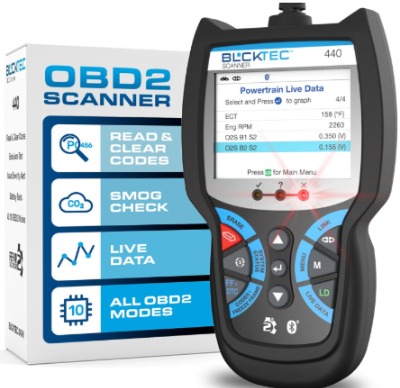
The BLCKTEC 440 is a budget-friendly Bluetooth scanner aimed squarely at beginners and casual users. It reads and clears basic trouble codes, shows live data, and includes a battery and charging system test, all through a companion app on your phone.
Best Use Cases
This scanner is a strong fit for:
- First-time buyers who just want to know what a check engine light means
- Anyone who wants a simple, no-frills tool for occasional use
- Drivers who want to keep an eye on battery and alternator health
- Budget-conscious shoppers who don’t need ABS or SRS code reading
Key Features Explained Simply
- Live data streaming: Watch real-time numbers like engine RPM, coolant temperature, and fuel trim as your engine runs. This helps spot a problem building up before it triggers a full warning light.
- Battery and charging system test: This checks whether your battery is holding a proper charge and whether your alternator is charging correctly, which is handy for catching a weak battery before it strands you.
- Wide vehicle compatibility: Works with any OBD2 compliant car from 1996 onward, covering the vast majority of vehicles on the road today.
- Simple app interface: The app keeps things straightforward, focusing on code reading and clearing without overwhelming menus.
Real-Life Usage Insight
A common use case here is catching a random check engine light triggered by something minor, like a loose gas cap or a small vacuum leak. Plugging in, reading the code, clearing it, and watching to see if it comes back is a routine that takes just a couple of minutes with this tool, and it saves a trip to an auto parts store just to get a free code check.
The battery test feature also comes in handy heading into colder weather, letting you catch a weak battery before it leaves you stuck in a parking lot.
Pros
- Very affordable price point compared to the other tools here
- Simple, beginner-friendly app
- Includes live data and battery testing, which is unusual at this price
- Works over Bluetooth, so no cords needed
- Covers all OBD2 compliant vehicles from 1996 and up
Cons
- No ABS, SRS, or TPMS code reading, so warning lights for brakes or airbags stay a mystery
- Repair explanations are more basic and less detailed than pricier competitors
- Build quality feels less rugged than the higher-priced options
- App occasionally needs a restart to reconnect after losing Bluetooth signal
Performance Discussion
For its price, the BLCKTEC 440 performs its core job well: reading and clearing engine codes and showing live data without major hiccups. Where it falls behind is in the depth of information, since it won’t tell you much beyond the code itself and a short description.
Ease of Use
This is genuinely one of the easier scanners to pick up and use with zero experience. Plug it in, pair it in the app, and you’re looking at your car’s data within a minute. The lack of advanced menus actually works in its favor for someone who just wants quick answers.
Value for Money
For the price, this scanner covers a lot of ground. It’s not going to replace a shop-level tool, but for someone who just wants to understand basic check engine codes and keep tabs on their battery, it delivers solid value.
4. Innova 1000 Bluetooth OBD2 Scanner
Product Overview
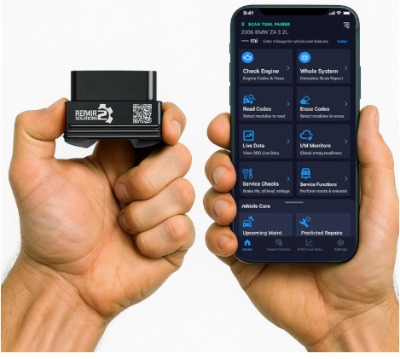
The Innova 1000 is a Bluetooth scanner built for smartphone use, pairing with an app on iPhone or Android. It focuses on reading and clearing codes for the check engine light, ABS, and SRS systems, along with a feature that aims to flag developing problems before they turn into a full warning light.
Best Use Cases
This tool works well for:
- Owners who want ABS and SRS code reading without stepping up to a pricier bidirectional tool
- People who like the idea of catching a problem early through predictive alerts
- Anyone who wants a trusted brand name with a simple app experience
- Drivers who want to avoid subscription costs while still getting solid coverage
Key Features Explained Simply
- Predictive diagnostics: The app looks at data patterns and tries to flag issues that might be developing, aiming to give you a heads-up before a light actually turns on. Think of it as an early warning system rather than a guarantee.
- Multi-system code reading: Beyond the engine, it also reads ABS and SRS codes, covering brakes and airbags in addition to the usual check engine light.
- No subscription model: Like BlueDriver, this tool skips recurring fees, so the price you pay upfront is the price you pay, period.
- Simple mobile app: Built for quick pairing and a clean, easy-to-read display of codes and explanations.
Real-Life Usage Insight
A typical use case involves a driver noticing a slightly rough idle or a subtle vibration that hasn’t yet triggered a warning light. Running a scan and watching the predictive diagnostics can sometimes catch an early code or trend before it becomes a full-blown dashboard warning, giving a bit of a head start on getting it looked at.
It’s also a solid option for someone who wants ABS and SRS access without committing to the steeper learning curve of a bidirectional tool.
Pros
- Reads engine, ABS, and SRS codes at a reasonable price point
- No subscription fees required
- Predictive diagnostics add a nice early-warning layer
- Backed by a well-known, established brand in the diagnostic space
- Straightforward app that beginners can pick up quickly
Cons
- No TPMS reading, unlike some competitors in this roundup
- Predictive alerts are a nice bonus but shouldn’t be treated as a guarantee against surprise breakdowns
- Slightly less detailed repair reports compared to BlueDriver
- Bidirectional testing is not included at this tier
Performance Discussion
Code reading and clearing works smoothly, and the ABS and SRS support adds real value over a basic engine-only reader. The predictive diagnostics feature is a nice touch, though it works best as a supplement to regular scans rather than something you rely on alone.
Ease of Use
Setup mirrors most Bluetooth-based scanners: plug in the dongle, open the app, pair, and start reading. The interface keeps things clear for beginners while still offering enough depth for someone who wants to dig a little further into their car’s systems.
Value for Money
Landing between the budget BLCKTEC option and the pricier BlueDriver and Innova 5610, this scanner offers a nice middle ground of features and cost. For drivers who want ABS and SRS coverage without stepping up to bidirectional testing, it’s a smart pick.
A Quick Note on the Duplicate Listing
You may have noticed the BlueDriver Bluetooth Scanner appears twice in this roundup’s original product list. That’s the same tool both times, not two different versions, so everything covered in the BlueDriver section above applies either way it’s listed.
Comparison Insights
Laying these four tools side by side helps highlight where each one earns its spot on a shopping list.
On code coverage: BlueDriver and the Innova 1000 both go beyond basic engine codes into ABS and SRS territory, with BlueDriver adding TPMS support on top of that. The BLCKTEC 440 sticks to engine codes and live data only, while the Innova 5610 covers a broad range of systems along with bidirectional testing.
On ease of use: The BLCKTEC 440 is the simplest to pick up cold, followed closely by BlueDriver and the Innova 1000, both of which lean on clean phone apps. The Innova 5610 asks for a bit more patience due to its standalone screen and deeper menu system.
On price versus features: The BLCKTEC 440 wins on pure affordability, while the Innova 5610 sits at the top of the price range thanks to its bidirectional testing and phone support. BlueDriver and the Innova 1000 land in between, offering a strong middle ground of features without the steepest price tag.
On repair guidance: BlueDriver’s repair reports stand out as the most detailed of the bunch, pulling in community data and plain-language explanations. The Innova 1000’s predictive diagnostics offer a different kind of value, aiming to catch problems early rather than just explaining codes after the fact.
On depth for serious DIY work: The Innova 5610 is the clear pick if you plan on doing real diagnostic and repair work at home, since bidirectional testing lets you confirm parts are actually faulty instead of guessing.
Buying Guide: What to Look for in an OBD2 Scanner
Shopping for a scan tool gets a lot easier once you know what actually matters. Here’s a breakdown of the key factors worth weighing before you buy.
Code coverage: Decide if you only care about the check engine light, or if you also want ABS, SRS, and TPMS coverage. A basic engine-only reader costs less but leaves brake and airbag warning lights a mystery.
App versus standalone screen: Bluetooth dongles that pair with your phone tend to cost less and stay pocket-sized, but they depend on your phone working and having a charge. Standalone handheld units cost more but don’t rely on a separate device.
Bidirectional support: If you plan on doing real repair work, not just reading codes, bidirectional testing lets you send commands to parts and confirm they’re actually faulty. Casual users rarely need this feature.
Subscription fees: Some tools quietly lock features behind a monthly or yearly subscription. All four tools in this roundup skip that model, which is worth appreciating since ongoing fees can add up fast over a few years of ownership.
Update policy: Cars keep getting new codes and systems added over time, so check whether software updates are included for free or cost extra down the line.
Vehicle compatibility: Confirm your car’s year, make, and model is supported, especially for less common European or older vehicles, since coverage can vary between brands.
Support options: A tool backed by real phone or chat support can be a lifesaver when you’re staring at a confusing code and don’t know where to start.
Who Should Buy These Products
New car owners who just want peace of mind: The BLCKTEC 440 or BlueDriver make sense here, giving you a quick way to check what a warning light means without needing deep mechanical knowledge.
Used car shoppers doing pre-purchase inspections: BlueDriver stands out thanks to its wide code coverage and detailed repair reports, helping you spot hidden issues before signing paperwork.
DIY mechanics who do their own repairs: The Innova 5610 is built for this crowd, with bidirectional testing that goes beyond basic code reading.
Budget-focused casual users: The BLCKTEC 440 covers the basics without asking for a big spend, making it a smart entry point tool.
Drivers who want a bit of everything without going all-in on bidirectional testing: The Innova 1000 hits a nice middle ground with ABS, SRS, and predictive diagnostics at a moderate price.
Common Mistakes to Avoid When Buying and Using an OBD2 Scanner
Assuming every scanner reads every system: Plenty of budget tools only read engine codes, leaving ABS, SRS, and TPMS lights completely unread. Check the product details carefully before assuming a scanner covers everything your dashboard might throw at you.
Clearing codes without understanding them first: It’s tempting to clear a code the second it pops up, but doing so erases the freeze frame data that helps pinpoint the actual cause. Read and research the code first, then clear it once you understand what triggered it.
Ignoring vehicle compatibility: Not every scanner works flawlessly with every make and model, especially for bidirectional functions. A quick compatibility check before buying saves a returns hassle later.
Skipping app or firmware updates: An outdated app or scanner firmware can miss newer codes or misread information. Keeping the software current avoids confusing or incomplete results.
Treating a scan as a full diagnosis: A code points you in a direction, it doesn’t hand you a finished diagnosis. A code for a sensor might mean the sensor itself is bad, or it might mean wiring, a connector, or another part upstream is the real culprit. Some further checking is usually needed before replacing parts.
Forgetting the battery voltage matters: A weak car battery can cause a scanner to behave oddly or throw false readings. If your scan results seem strange, checking battery voltage first is a smart move before assuming the scanner itself is broken.
Buying based on price alone: The cheapest scanner isn’t always the best value if it leaves major systems unread. Balancing price against actual coverage and features tends to pay off more in the long run.
Final Verdict
All four scanners covered here do their core job well, but they’re built for slightly different people.
If you want the most well-rounded tool with strong code coverage across engine, ABS, SRS, and TPMS systems, along with genuinely useful repair reports, BlueDriver is the strongest all-around pick in this roundup. It balances price, coverage, and ease of use better than the rest.
If you’re serious about doing your own repair work and want bidirectional testing to actually confirm faulty parts instead of guessing, the Innova 5610 is worth the extra investment, especially with US-based phone support backing it up.
If your budget is tight and you mainly want to understand check engine lights along with keeping an eye on your battery health, the BLCKTEC 440 delivers solid value without asking for much money.
If you want ABS and SRS coverage plus a nice early-warning feature without stepping up to a bidirectional tool, the Innova 1000 lands in a comfortable middle ground.
There’s no single “best for everyone” answer here, since the right scanner really comes down to how deep you want to go with your own car maintenance and repair work. But whichever one you land on, having any of these tools in your glovebox beats being stuck guessing at a dashboard warning light with no way to check what’s actually going on under the hood.

Peterson is an automotive enthusiast and auto parts reviewer with a passion for vehicle maintenance, upgrades, and performance. He enjoys researching and testing car parts, tools, and accessories to help drivers make informed buying decisions. Through AutoPartsTalk.com, Peterson shares honest reviews, practical maintenance tips, and expert guides to keep vehicles running safely and efficiently.