How to Change Ford Door Code?
So your Ford vehicle has a keypad door lock, and you want to change the code? Maybe you’ve shared it with someone and now want privacy back. Or perhaps you simply forgot your current code. Whatever the reason, changing your Ford door code is something you can do yourself without spending money at a dealership. This guide walks you through the entire process in simple, easy-to-follow steps.
Why You Should Know How to Change Your Ford Door Code
Your vehicle door code gives you access to your car without using a key. It’s a solid security feature that Ford puts on many models. Learning how to change this code puts you in control of your vehicle’s security. You save money by doing it yourself, and you get the job done quickly, often in just a few minutes.
Changing your Ford keypad access code is helpful in many situations. Maybe a family member moved away and you want to remove their code. Perhaps someone saw you enter the code and you feel less secure. You might also want to change it if you’ve had your car serviced and the dealer or mechanic has access to your current PIN code.
Ford Models That Have Keypad Door Locks
Not all Ford vehicles come with this feature, but many newer models do. The keyless entry door lock system appears on vehicles like the F-150, Mustang, Explorer, Edge, Fusion, and Escape. Some older Ford models also have this handy feature. Check your owner’s manual or look at your car door to see if you have a numeric keypad. If you see a small box with numbers on your driver-side door frame, you’ve got the right vehicle for this task.
What You Need Before Starting
Good news: changing your Ford door lock code doesn’t require special tools or equipment. You won’t need a screwdriver, a wrench, or anything complicated. All you need is your vehicle, access to the driver’s side door, and the ability to remember your new code. Some people like to have their owner’s manual nearby as a reference, though our guide covers everything you need to know.
Make sure you have a safe, quiet place to work. While this process takes only a few minutes, you want to focus without distractions. Also, remember that you’ll enter codes on a keypad, so having dry hands helps. Wet fingers sometimes struggle to register properly on electronic keypads.
Step 1: Gather Your Information
Before you start making changes to your Ford door entry code, get clear on what you’re doing. Do you want to replace your old code with a completely new one? Are you setting up a code for the first time? Or do you need to add a second code to your keypad?
Your Ford vehicle likely came with a factory-set code, often a four-digit PIN number. Some vehicles allow you to set a custom code, while others have restrictions on what codes work. Read your owner’s manual to understand your specific Ford model’s capabilities.
Jot down what you want to accomplish. Write down your new code idea in a safe place. Never share this code with anyone you don’t trust, as giving someone your Ford door access code means they can unlock your vehicle anytime they want.
Step 2: Locate Your Keypad and Understand Its Layout
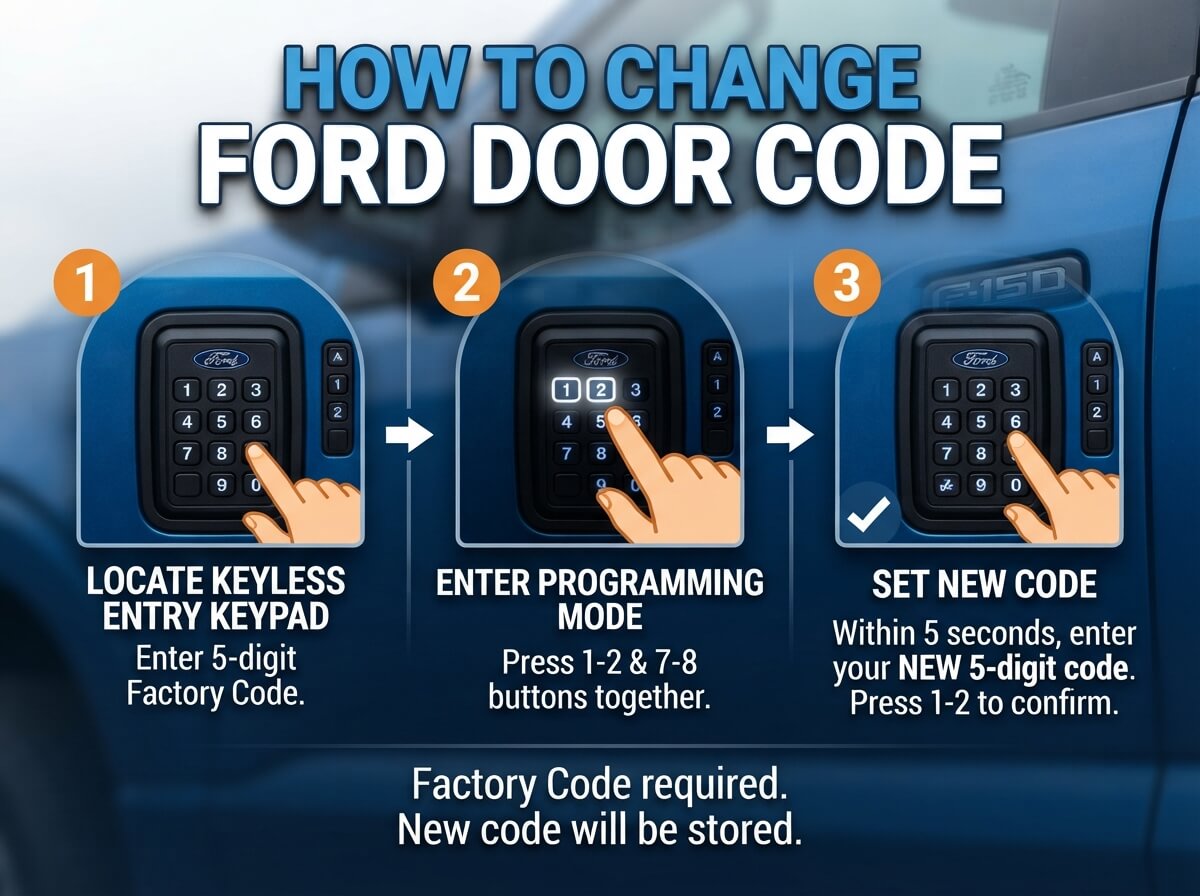
Walk over to your Ford vehicle and find the numeric keypad. On most Ford models, this sits on the driver-side door, near the door handle. Look for a small box with numbers zero through nine, usually arranged in a standard phone-style grid. Some vehicles have the keypad recessed into the door panel, while others have it sticking out slightly.
Take a moment to examine the keypad up close. Press a few numbers just to see how it responds. Does it light up? Do you hear a beep? Does the screen show the numbers you’re pressing? Getting familiar with how your specific keypad works makes the next steps easier.
Look for any other buttons near the keypad. Some Ford models have a small button labeled “enter” or “clear” that you’ll use during the code change process. Knowing where everything sits before you start prevents confusion later.
Step 3: Understand Your Ford’s Specific Process
Different Ford models sometimes use slightly different methods for changing door codes. The basic concept stays the same, but the exact button sequence can vary. This is why knowing your vehicle’s specific year and model helps. While we’ll cover the standard process that works for most Ford vehicles, your owner’s manual shows the precise steps for your exact model.
Check whether your Ford uses a four-digit code, five-digit code, or another length. Some Ford vehicles let you set your own length, while others require a specific number of digits. Your owner’s manual tells you this information clearly.
Also find out if your vehicle has a factory-set master code that you need to know. Many Ford models come with a code programmed by the manufacturer. You might need this master code to change your personal code, or you might not. Your manual explains this part.
Step 4: Enter Programming Mode
This is where the actual code change begins. To change your Ford door lock code, you need to enter what Ford calls “programming mode.” This puts your vehicle’s keypad system into a state where it’s ready to accept new codes.
First, unlock your Ford using the regular key or key fob. You need the doors unlocked before you can program a new code. Close the driver’s side door while keeping the vehicle unlocked.
Now, look at your keypad again. You’ll need to press a specific sequence to enter programming mode. For many Ford models, this involves pressing and holding the “5” and “0” buttons together for several seconds. You might see the keypad light up, flash, or hear a beep when programming mode activates. Don’t release the buttons until you see this response.
Some Ford vehicles use a different entry sequence. Check your owner’s manual for your exact model’s method. The manual will show you exactly which buttons to hold and for how long.
Step 5: Clear Your Old Code
Once you’re in programming mode, many Ford vehicles require you to clear the existing code before entering a new one. This step ensures that the old code won’t work anymore.
To clear the old code, press the button or button combination that your manual specifies for deletion. Often this involves pressing “7” and “8” together or following another sequence unique to your Ford model. Your keypad should give you some feedback, like a flash or beep, confirming that the old code has been cleared.
If you’re not sure whether your Ford requires this step, your owner’s manual explains it clearly. Some models skip this step and let you just enter a new code over the old one.
Step 6: Enter Your New Ford Door Code
Now comes the exciting part: entering your brand new access code. This is the PIN that will unlock your car door going forward, so make it something you can remember but something other people can’t guess.
Press the numeric digits of your new code on the keypad. Most Ford models use a four-digit code, though you should verify this with your manual. Press each digit clearly and deliberately. There’s no rush, so take your time and make sure each number registers before pressing the next one.
As you press each digit, look at the keypad response. Some models show the numbers on a small display screen as you enter them. Others give you a beep for each digit pressed. This feedback helps you confirm that the keypad is registering your entries correctly.
Once you’ve entered all digits of your new code, look for what comes next. Most Ford keypads require you to press an “enter” button, a green checkmark symbol, or a specific confirmation button. Sometimes you press the same button combination that activated programming mode to confirm your new code. Check your manual for the exact confirmation method.
Step 7: Confirm Your Programming Was Successful
After you confirm your new code entry, your Ford will typically give you a response indicating success. This might be a series of beeps, a light flash pattern, or another signal. Some vehicles turn on the interior lights briefly to show the programming worked.
Exit programming mode by pressing the button sequence specified in your manual, or the vehicle might exit automatically after a short time. Close the keypad cover if your model has one.
Now test your new code. Stand back from your Ford and press your new code on the keypad. The door should unlock smoothly. If it does, success! Your new code works perfectly.
If the door doesn’t unlock, don’t panic. You can try again. Go back to step four and repeat the process. Sometimes the first attempt has a small mistake, maybe a digit pressed incorrectly or a timing issue with button holds. The second attempt usually works fine.
Step 8: Test Multiple Times
Before you consider this task complete, test your new Ford door code several times. Enter it in different ways. Try entering it quickly, then slowly. Try entering it with different fingers or hands. Make sure the code works consistently, no matter how you press it.
Also test from different distances from your car. Stand close to the door and enter the code. Then move back a few feet and try again. The keypad should work from a reasonable distance, though it won’t work from extremely far away like across a parking lot.
Tips for Choosing a Strong Door Code
Your Ford door code should be something you remember easily but others can’t guess. Avoid using obvious codes like your birthday, your address, or a simple sequence like “1-2-3-4.” These codes are too easy for someone to guess.
Think about combinations that have personal meaning to you but seem random to others. Some people use significant numbers from their life, like an area code from where they lived, a lucky number, or a combination of numbers from different dates. The key is making it memorable for you while staying unpredictable for others.
Don’t write your code down or share it with people you don’t completely trust. Treat your Ford door code the same way you’d treat a password for your bank account. Only tell people who genuinely need access to your vehicle.
If you do need someone else to access your car temporarily, consider having them memorize the code rather than writing it down. Once they no longer need access, you can change the code again.
Troubleshooting Common Issues
Sometimes your Ford door code change doesn’t work perfectly on the first try. Here are common problems and how to solve them.
If your keypad doesn’t respond when you press buttons, make sure your car doors are unlocked before you start. Some Ford models won’t let you enter programming mode if the doors are locked. Try unlocking with your key fob and then starting over.
If you enter programming mode but can’t figure out the next step, stop and consult your owner’s manual. Different Ford models have slightly different sequences, and following the wrong steps might lock you out of the system temporarily. Your manual has the exact process for your vehicle.
If you enter a new code but it doesn’t work when you test it, try entering programming mode again and re-entering the code. Make sure you’re pressing each digit clearly and confirming your entry with the correct button. Also double-check that you’re pressing the numbers you intended to press.
If your keypad is physically damaged, cracked, or the buttons don’t respond when you press them, you might have a hardware problem. In this case, visit a Ford dealer, as you may need to replace the keypad itself.
When to Call a Professional
Most people successfully change their Ford door codes on their own. However, some situations call for professional help.
If your keypad doesn’t respond at all, your vehicle might have an electrical issue. Take it to a Ford dealership so a technician can diagnose the problem. If your vehicle is very old and uses an outdated keypad system, a dealer might need to help you.
If you’ve tried the programming process several times and it still doesn’t work, a Ford technician can help. They have diagnostic tools that can check whether your keypad system is functioning properly.
If you’ve forgotten your factory master code and can’t access programming mode, a dealer might be able to help you reset your system, though this might cost money.
Summary: Changing Your Ford Door Code Is Easy
Changing your Ford keypad door lock code is a straightforward task that most vehicle owners can complete in just a few minutes. You don’t need special skills, tools, or equipment. You just need your vehicle, your owner’s manual, and a few minutes of focus.
Follow these steps carefully: locate your keypad, gather your information, enter programming mode, clear the old code, enter your new code, confirm the change, and test thoroughly. Within minutes, you’ll have a new security code that only you know.
Remember that your door code is part of your vehicle’s security. Treat it carefully. Change it whenever you feel it’s necessary, and don’t share it casually. With your new knowledge, you’re in complete control of your Ford’s keypad door lock system.
Take action today. If you’ve been putting off changing your Ford door code, follow this guide and do it now. You’ll feel more secure knowing you have a private code that only authorized people know. Your vehicle’s keyless entry system becomes even more valuable when you control who has access.

Peterson is an automotive enthusiast and auto parts reviewer with a passion for vehicle maintenance, upgrades, and performance. He enjoys researching and testing car parts, tools, and accessories to help drivers make informed buying decisions. Through AutoPartsTalk.com, Peterson shares honest reviews, practical maintenance tips, and expert guides to keep vehicles running safely and efficiently.