
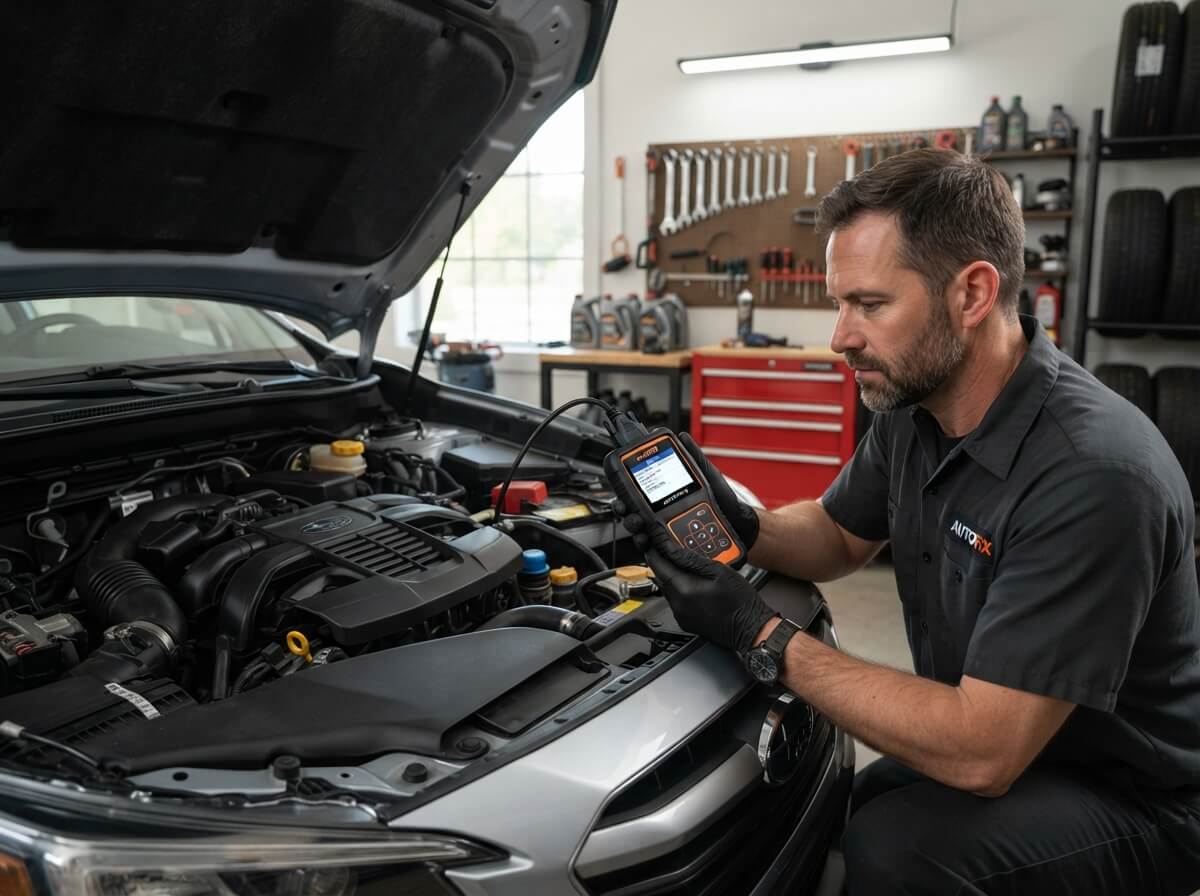
5 Best Code Reader for Home Mechanics In 2026
A check engine light can ruin your mood fast. The dash glows orange, you have no idea why, and the shop quote could be anything. A small plug-in tool can take most of the mystery out of that moment. If you want the best code reader for home mechanics, this roundup walks you through five popular options, from a bare-bones code reader to a scanner that talks to more than just the engine.
You won’t find hype here. Each review covers what the tool is, what it does well, where it falls short, and who it fits. The article also includes a comparison section, a buying guide, a list of common mistakes, and a final verdict.
Quick note before we start. Listings for these tools change often, and sellers sometimes bundle different versions under one name. Always check the current product page for exact specs, language support, and update details before you pay.
Why Home Mechanics Need a Code Reader
Every gas car sold in the US from the mid-nineties onward has an OBD2 port. That port sits under the dash, usually near the driver’s knees. The car’s computer uses it to share trouble codes, sensor readings, and system checks. A code reader plugs into that port and turns the car’s “computer talk” into something you can read.
Here is what a decent code reader helps you do:
- Find out why the check engine light came on
- Clear the light after a repair
- Check if the car is ready for an emissions test
- Spot a failing sensor before it strands you
- Avoid paying a shop only to read a code
- Talk to a mechanic with more confidence
A code reader will not fix the car for you. A code is a clue, not a final answer. A misfire code, for example, can come from a bad spark plug, a weak coil, a vacuum leak, or a clogged injector. The scanner points you to the right neighborhood. You still have to knock on the right door.
Even so, a small scan tool often pays for itself the first time it saves you a shop visit.
Quick Comparison Table
| Product | Best For | Live Data | Extra Systems (ABS/SRS/Trans) | Skill Level |
|---|---|---|---|---|
| ANCEL AD310 | Simple code reading | Limited | No | Total beginner |
| FOXWELL NT301 | Learning and live data | Yes, with graphs | No | Beginner to intermediate |
| ANCEL AD410 | Budget live data | Yes | No | Beginner |
| FOXWELL NT604 Elite | Multi-system checks | Yes | Yes (coverage varies by vehicle) | Intermediate |
| MOTOPOWER MP69033 | Tight budgets, glovebox backup | Basic | No | Total beginner |
Individual Product Reviews
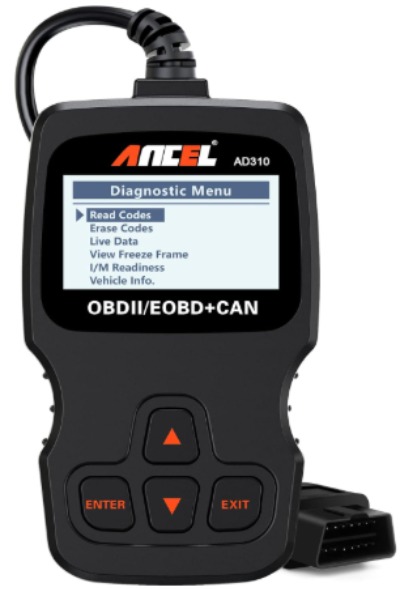
1. ANCEL AD310 Classic Enhanced Universal OBD II Scanner
Product Description
The ANCEL AD310 is a handheld code reader built for one main job: read the trouble codes, show what they mean, and clear them when you finish the repair. It uses a wired design with a built-in cable. It draws power straight from the OBD2 port, so it needs no batteries and no charging. You plug it in, turn the key to the on position, and it starts talking to the car.
It works with OBD2 vehicles from the mid-nineties onward that use the standard protocols, including the CAN protocol found on newer cars. The “Classic” in its name fits. It feels like the old-school code readers many people grew up seeing in shop drawers.
Best Use Cases
This tool fits people who want a no-fuss answer to “why is my light on?” It works well for:
- First-time car owners
- Teens learning basic car care
- Anyone who wants a backup scanner in the trunk
- Quick checks before buying a used car
- Light-duty use on family cars
Key Features Explained Simply
Read and clear codes. The scanner pulls stored and pending trouble codes from the engine computer. It can also erase them after a fix, which turns off the check engine light.
I/M readiness. This feature shows if the car’s emission monitors have finished their self-checks. It matters if your area requires an emissions test. A car that just had its codes cleared often shows “not ready” for a while.
Freeze frame data. When a fault happens, the car saves a snapshot of conditions at that moment, such as engine speed and coolant temperature. This helps you figure out when the problem shows up.
Built-in code definitions. The tool shows a short description for each code, so you don’t need to flip through a manual or search online for every one.
Simple button layout. A few buttons handle all the menu moves. There is very little to learn.
Real-Life Usage Insight
Think about a common weekend situation. A driver notices the light on the way home. They plug in the AD310, turn the key, and wait a few seconds. A code appears, something like a small evaporative leak code. The short description points toward the fuel system. The driver checks the gas cap, finds it loose, tightens it, clears the code, and drives normally. The whole job takes about five minutes.
That is where this tool shines. It gives fast, direct answers to common problems. It does not bury you in menus.
The other side of that story is that more complex problems need more information. A rough idle with a lean code, for example, often calls for watching fuel trim values in real time. A basic code reader gives you only a limited view of that, so you might end up guessing or buying a second tool.
Performance Discussion
Connection speed is quick on most standard cars. The scanner pulls codes in a few seconds and refreshes without trouble. Reading accuracy matches what you would expect from a tool of this class. It reads the same standard codes that any OBD2 reader pulls from the engine computer.
The limits are about depth, not accuracy. This tool covers the standard engine and emissions side of the car. It does not read brand-specific codes or other modules like airbags and ABS.
Ease of Use
This is one of the easiest scanners you can use. The menus are short, the screen is small but clear, and the workflow is: plug in, turn key on, read, done. A complete beginner can learn it in minutes.
Pros
- Very easy to use
- No batteries needed
- Compact and easy to store
- Fast code reading
- Includes readiness check and freeze frame
- Works with a wide range of OBD2 cars
Cons
- Limited live data compared with higher-end tools
- Engine and emissions only, no ABS or airbag checks
- Small screen and basic design
- Built-in cable can feel short for some vehicles
- Not ideal for deeper diagnosis
Value for Money
The AD310 sits in the low-price range. For what it does, the price is fair. If you only want to read and clear codes, you get what you pay for without extra features you won’t use. If you expect to dig into sensor data, you will outgrow it quickly.
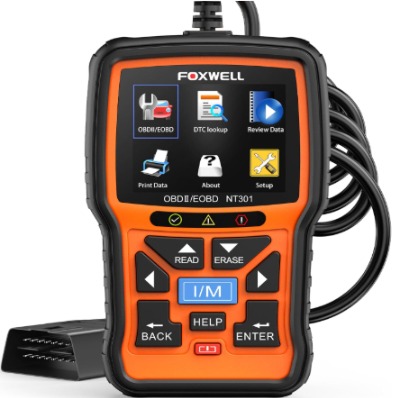
2. FOXWELL NT301 OBD2 Scanner Live Data Professional Mechanic OBDII Diagnostic Code Reader
Product Description
The FOXWELL NT301 steps up from a basic code reader. It has a color screen, a more detailed menu, and a stronger set of OBD2 test functions. The name says “Professional Mechanic,” but in practice it fits the serious home mechanic better. It does not replace a full shop scanner, yet it handles the standard OBD2 test modes with more detail than most entry-level tools.
Like the AD310, it plugs into the OBD2 port and gets power from the car. It reads codes, shows live data, and offers extra checks for emissions systems.
Best Use Cases
The NT301 works well for people who want to learn how their car behaves, not just read a code. It suits:
- Home mechanics who swap parts like sensors, coils, and plugs
- Drivers who want to confirm a repair worked
- People who own more than one car
- Hobbyists who like watching engine data
- Anyone who wants a long-term tool, not a throwaway one
Key Features Explained Simply
Live data stream. The scanner shows real-time sensor values, such as coolant temperature, engine speed, throttle position, and fuel trim. You can watch these numbers while the engine runs.
Data graphing. Some live data can be shown as a line graph. This helps you spot patterns, like an oxygen sensor that reacts too slowly.
Freeze frame and readiness. Same idea as the AD310: a snapshot of conditions when the fault set, plus a check of emissions monitors.
O2 sensor test and on-board monitor results. These extra test modes give more detail about sensor behavior and system checks that the car runs on its own.
EVAP system test. On supported cars, this function helps with leak checks in the evaporative system.
Color display. A color screen makes menus and data easier to read than a plain monochrome one.
Update support. The brand offers software updates, which helps keep the tool current. Check the listing for exact update steps and whether they cost anything.
Real-Life Usage Insight
Say a car runs rough on cold mornings and the light comes on with a lean code. A basic reader gives you the code and little else. With the NT301, you can watch short-term and long-term fuel trim while the engine idles, then raise the revs and see how the numbers move. If the lean condition fades as the engine speeds up, that points toward a vacuum leak. If it gets worse, you might look at fuel delivery.
That kind of back-and-forth is why live data matters. You stop guessing and start testing.
It also helps after repairs. You can replace an oxygen sensor, clear the code, and then watch the new sensor’s readings to confirm it behaves normally.
Performance Discussion
On most compatible vehicles, the NT301 connects fast and refreshes data at a pace that feels responsive. Graphing works fine for casual diagnosis. It is not built for lab-level data capture, but it covers what a home mechanic needs.
Accuracy matches what the car’s computer reports. A scanner shows what the car says. If a sensor lies, the scanner repeats the lie. That is true for every tool in this roundup.
Ease of Use
The menu takes a little longer to learn than the AD310, but it stays friendly. Options are labeled in plain terms, and the layout feels logical. A beginner can start with basic code reading and grow into the live data screens over time.
Pros
- Strong live data with graphing
- Extra OBD2 test modes for deeper checks
- Clear color screen
- Good learning tool
- Solid build for the price range
- Update support from the brand
Cons
- Still limited to the engine and emissions side
- Extra features can feel confusing at first
- No ABS or airbag access
- Costs more than basic readers
- Screen size is fine, but not large
Value for Money
For the home mechanic who wants to learn, the NT301 offers strong value. You pay more than a simple reader, yet you get features that help you diagnose, not just read. If you plan to do your own repairs often, this is a smart middle-ground pick.
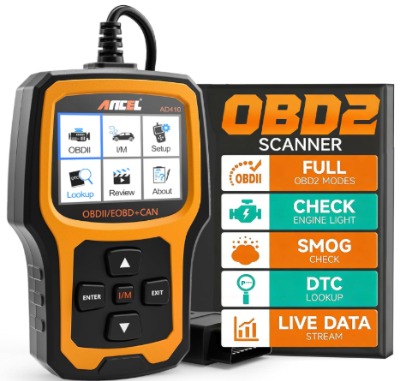
3. ANCEL AD410 Enhanced OBD2 Scanner
Product Description
The ANCEL AD410 sits between the AD310 and more advanced tools. Think of it as a small step up from a plain code reader. It keeps the same easy plug-and-play style but adds more data and a slightly more capable feature list. It comes in a black and yellow body, which stands out in a toolbox and makes it easy to find.
It targets vehicles from the mid-nineties onward that follow the OBD2 standard, and it handles common protocols, including CAN.
Best Use Cases
The AD410 fits people who want some live data without paying for a full-featured scanner. It works for:
- New car owners who want more than just a code
- Drivers who want to check fuel trim or temperature readings
- Weekend mechanics doing basic maintenance
- Families who share tools across several cars
- Anyone who wants an easy tool with room to grow
Key Features Explained Simply
Code reading and clearing. The core job, handled quickly.
Live data. You can watch common sensor readings in real time. It is not as deep as the NT301, but it covers the basics well.
Freeze frame. A snapshot of the moment a fault set.
I/M readiness. A quick check to see if the car is ready for an emissions test.
Vehicle information. The tool can pull details such as the vehicle identification number from compatible cars, which helps confirm you connected to the right vehicle.
Code lookup. Built-in definitions make codes easier to read without outside help.
Simple interface. Buttons are clear, and the menu stays shallow.
Real-Life Usage Insight
Picture a typical driveway scenario. A car shows a code for a cylinder misfire. The driver plugs in the AD410, reads the code, and checks freeze frame to see that the misfire happened under load at highway speed. That detail points toward ignition parts, since ignition faults often show up when the engine works harder.
The driver swaps the coil and plug on the affected cylinder, clears the code, and takes a test drive. If the light stays off, the job is done. If the same cylinder misfires again, the problem could be the injector or something mechanical, and the driver knows to look further.
The AD410 does not give a mechanic-level view of the engine, but it gives enough context to make smart first guesses.
Performance Discussion
Performance is steady for everyday use. Reading codes takes a few seconds, and live data refreshes at a usable rate. Compared with the NT301, the data view feels more basic and the tool offers fewer extra test functions. For routine diagnosis, that is usually fine.
As with all budget scanners, expect the standard generic codes. Brand-specific codes and other vehicle modules are out of reach.
Ease of Use
The AD410 is easy to learn. It keeps the same “plug in, read, clear” simplicity as the AD310 and adds a few more screens. A beginner can use the basics in minutes and explore the live data menu when ready.
Pros
- Easy to use
- Adds live data over the basic reader class
- Affordable
- Includes freeze frame and readiness checks
- Compact and sturdy-feeling body
- No battery needed
Cons
- Fewer advanced tests than the NT301
- Engine and emissions only
- Screen and graphing are basic
- Corded design limits placement
- Not suited for deep diagnosis
Value for Money
The AD410 hits a nice price-to-feature balance. It costs a little more than the AD310 but gives you live data, which makes a real difference when a code alone does not tell the full story. For budget buyers who want room to grow, it is a sensible pick.
4. FOXWELL NT604 Elite OBD2 Scanner (ABS, SRS, Transmission)
Product Description
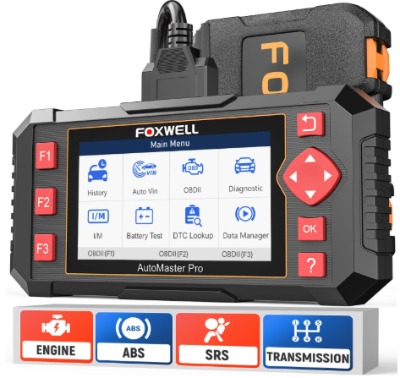
The FOXWELL NT604 Elite is a different kind of tool. The earlier three focus on the engine and emissions side. The NT604 Elite goes further and can talk to several vehicle systems on supported cars, including the ABS (anti-lock brakes), the SRS (airbag system), and the transmission, on top of the engine.
That matters because many warning lights have nothing to do with the engine. A glowing ABS light or an airbag light will not show up on a basic code reader. The NT604 Elite can read and clear codes for those systems on many vehicles. Coverage varies by make, model, and model range, so check the compatibility list on the product page before buying.
Best Use Cases
This scanner fits home mechanics who work on cars and want more than engine data. It suits:
- Drivers who see ABS or airbag lights
- People with transmission shifting concerns
- Families with several cars from different brands
- Hobbyists who do brake work, suspension work, or wheel speed sensor swaps
- Anyone who wants one tool for several warning lights
Key Features Explained Simply
Multi-system diagnosis. Besides the engine, the tool can read and clear codes in the ABS, SRS, and transmission control modules on supported vehicles.
Live data for supported systems. You can view sensor values from these modules, not only the engine. A wheel speed sensor reading, for example, can help you find a failing sensor.
Full OBD2 functions. It also handles the standard engine and emissions features, including freeze frame and readiness.
Large color screen. The display is easier to read, and the menus feel more like a real diagnostic tool.
Vehicle coverage across many brands. It lists support for a broad range of makes, but the depth of coverage differs by brand and model.
Update support. Software updates help extend coverage over time. Check the listing for update details.
Real-Life Usage Insight
Think about a car with an ABS light that has been on for weeks. A basic reader says there are no codes, because it only looks at the engine computer. That leaves the driver stuck. With the NT604 Elite, the driver can open the ABS system, read a code that points to a specific wheel speed sensor, and check live data while rolling the wheel or driving. If one wheel reports odd values, the sensor or its wiring is the likely cause.
The same thinking applies to airbag lights. A code might point to a seat belt pretensioner circuit or a seat sensor. This is serious safety equipment, so treat any SRS repair with care. Reading the code is easy. Working around airbag parts needs proper safety steps, such as disconnecting the battery and following the repair manual. If you feel unsure, hand that job to a professional.
For transmissions, the tool can read codes related to solenoids and shift behavior. It does not replace a full dealer-level tool, but it can tell you if the problem is electrical or likely mechanical.
Performance Discussion
Communication is solid on supported vehicles. Menu navigation takes a bit longer than on engine-only readers because there are more systems to pick from. Once you find the right system, reading codes and data feels smooth.
Keep expectations realistic. This is a code reading and clearing tool for those extra systems. It is not a full bi-directional scan tool, so you generally cannot command parts to move, run deep calibrations, or do advanced programming. Some special reset functions might exist for certain cars, but support varies, so verify on the product page.
Ease of Use
The NT604 Elite takes more effort to learn than the first three tools. You choose the make, model, and system before the scan begins, and the menus run deeper. Still, the layout is clear, and a patient beginner can get comfortable after a few uses. The tool rewards people who like to learn.
Pros
- Reads ABS, SRS, and transmission codes on supported cars
- Also covers engine and emissions
- Larger color screen
- Live data for more than just the engine
- Great for multi-car households
- Useful for finding warning lights a basic reader cannot touch
Cons
- Coverage depends on car make, model, and age
- More menus to learn
- Costs more than basic readers
- Not a full dealer-level scanner
- Special functions vary, so check before assuming
Value for Money
For a home mechanic who keeps running into ABS or airbag lights, this tool can save real money. A single shop scan for those systems often costs a good chunk of what the tool does. If you only care about the check engine light, it is more tool than you need. If you want broader coverage, it earns its price.
5. MOTOPOWER MP69033 Car OBD2 Scanner Code Reader
Product Description
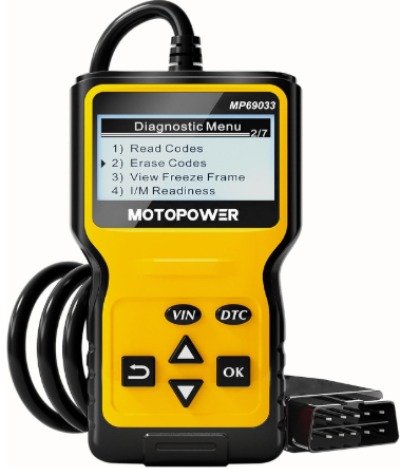
The MOTOPOWER MP69033 is a small, low-cost code reader with a bright yellow case. It follows the same basic idea as the AD310: plug into the OBD2 port, read the code, look up the meaning, and clear it after a fix. It works with OBD2 vehicles from the mid-nineties onward, and it supports the common protocols, including CAN.
The tool aims at people who want an affordable answer without learning a complicated device.
Best Use Cases
The MP69033 fits tight budgets and simple needs. It works for:
- First-time car owners
- Gifts for new drivers
- A spare reader in the glovebox
- Quick checks before a road trip
- Helping a friend or relative who has a warning light
Key Features Explained Simply
Read and erase codes. The main job, done in seconds.
Readiness status. A quick view of emissions monitors, useful before testing.
Freeze frame data. A snapshot of conditions when the fault happened.
Basic live data. It can show a handful of readings, which gives a small peek into engine behavior. The depth is more limited than the NT301 or AD410.
Compact build. It is small enough to toss in a glovebox or door pocket.
Powered by the car. No batteries, no charging.
Real-Life Usage Insight
A good picture of this tool is the family emergency kit. A parent hands a teen a car with a light on. The teen plugs in the MP69033, reads the code, and sees an oxygen sensor circuit code. The parent looks up the code, learns that this is a common wear item, and decides to schedule a part swap this weekend instead of panicking.
It also helps when you shop for used cars. A quick scan can show stored codes and readiness status, though a seller can clear codes right before a viewing. If the readiness monitors show “not ready,” treat that as a warning sign and ask questions.
For deeper work, the tool runs out of steam. If a problem needs fuel trim graphs or a stream of sensor data, you will want a stronger scanner.
Performance Discussion
For basic jobs, the MP69033 does what it promises. It connects quickly on most compatible cars and pulls codes without a long wait. The screen is small, and the interface is simple, so data views feel limited.
Build quality fits the price. It feels fine for occasional use, but treat the cable gently. Rough handling can wear any budget tool down faster.
Ease of Use
Very easy. A short menu and clear prompts mean almost no learning curve. If you can plug in a phone charger, you can use this scanner.
Pros
- Very low price
- Easy for beginners
- Compact and easy to store
- No batteries needed
- Covers the basics well
- Good backup tool
Cons
- Limited live data depth
- Engine and emissions only
- Small screen
- Feels less premium than higher-priced tools
- Not made for detailed diagnosis
Value for Money
At its price level, the MP69033 offers solid value for basic needs. It will not teach you much about your engine, but it will tell you why the light is on. For drivers who want a cheap safety net, it makes sense. For people who plan to fix cars often, a step up pays off.
Comparison Insights
Now that each tool has its own review, here is how they stack up against each other in the areas that matter most.
Simplicity
The AD310 and the MOTOPOWER MP69033 are the easiest tools here. Both focus on reading and clearing codes with very little else to learn. The AD410 sits close behind. The NT301 and NT604 Elite take more time to learn because they do more.
Depth of Information
The NT301 wins on engine data depth, with graphing and extra OBD2 test modes. The AD410 offers a lighter version of live data. The NT604 Elite goes the widest, since it covers more vehicle systems. The AD310 and the MP69033 give the least detail.
Warning Light Coverage
Only the NT604 Elite can look at ABS and airbag systems on supported cars. The other four stay with the engine and emissions side. This single difference can decide your purchase.
Price Tiers
Roughly speaking, the MP69033 and AD310 fall at the lowest end. The AD410 sits a bit higher. The NT301 lands in the middle. The NT604 Elite costs the most of the group. Prices shift, so check the current listings.
Learning Value
If you want a scanner that teaches you how engines behave, the NT301 is the strongest teacher in this group. Watching live data while the engine runs is one of the best ways to learn how fuel, air, and spark work together.
Portability
All five tools are small enough for a glovebox. The NT604 Elite is the largest, but still easy to carry.
Long-Term Growth
A beginner who buys the AD310 or MP69033 might outgrow it after a few repairs. The AD410 gives a bit more room. The NT301 and NT604 Elite offer the most runway for growing skills.
Buying Guide: How to Pick the Best Code Reader for Home Mechanics
A good pick starts with honest answers to a few simple questions. Use the guide below to narrow things down.
1. Start With Your Real Needs
Ask yourself what you plan to do with the scanner. If the answer is “tell me why the check engine light is on,” a basic reader does the job. If the answer is “help me fix problems and confirm the repair worked,” you need live data. If you have ABS or airbag lights, you need a multi-system tool.
2. Check Vehicle Compatibility
Most gas cars built from the mid-nineties onward use the OBD2 standard. Diesel cars, older cars, and some imports may have differences. Look at the compatibility list on the product page. Pay extra attention if you own a diesel truck, a hybrid, or an electric vehicle, since support and features can vary.
3. Think About Live Data
Live data is the biggest jump in usefulness. A code tells you what the car’s computer noticed. Live data shows you what the engine does in real time. It helps you confirm or rule out a guess. If you plan to do your own repairs, put live data high on your list.
4. Look at Extra Systems
Engine codes are only one part of the picture. ABS, SRS, and transmission modules have their own codes. A basic reader cannot see them. If your warning light is not the check engine light, you need a tool that supports those systems.
5. Look at Screen and Menu Design
A clear screen makes a real difference when you stand in a dim garage or hunch under a dashboard. Color screens help. Simple menus help even more. A tool you enjoy using is a tool you will actually pick up.
6. Check Update Support
Cars change every year, and scanners need updates to stay useful. Some brands offer free software updates, while others charge. Read the listing for details.
7. Think About Cable and Placement
All five tools here use a wired design. The OBD2 port sits in different places on different cars. A short cable can make it hard to read the screen while you sit in the driver seat. Check cable length details on the product page if that worries you.
8. Read Real Buyer Feedback
Look at recent buyer reviews for patterns. Pay attention to comments about compatibility, support, and long-term reliability. One angry review does not mean much, but repeated complaints about the same problem deserve attention.
9. Set a Fair Budget
You don’t need to spend a lot to get something useful. Still, the cheapest tool is not always the cheapest choice. A scanner that cannot show live data may push you to buy a second one later. Think about the total cost, not just the first price.
10. Check Warranty and Support
A tool with clear support and a return policy gives you peace of mind. If something does not work with your car, you want an easy way to sort it out.
Helpful Terms Every Beginner Should Know
A few simple terms will make scanner screens less scary.
OBD2. The standard system that lets tools talk to your car’s computer.
DTC (Diagnostic Trouble Code). A code that points to a problem, like P0301 for a misfire in cylinder one.
Freeze frame. A snapshot of car conditions when the fault happened.
Live data. Real-time sensor readings from the engine.
I/M readiness. A status check that shows whether the car’s emission monitors have finished testing.
Pending code. A code the car noticed once but has not yet confirmed.
Fuel trim. How much the engine computer adds or removes fuel to keep the mix right.
Oxygen sensor. A part in the exhaust that helps the engine computer balance fuel and air.
Misfire. A moment when a cylinder fails to burn fuel the right way.
Once you learn these, most scanner screens stop feeling foreign.
Who Should Buy These Products
Different people need different tools. Here is a simple guide.
The Total Beginner
If you have never used a scanner and just want to know what is wrong, the ANCEL AD310 or the MOTOPOWER MP69033 will serve you well. Both are simple, fast, and affordable. Pick whichever has the better price or buyer feedback at the moment.
The Curious Learner
If you like to watch what the engine does and learn as you go, the FOXWELL NT301 is the best fit. It gives you data, graphs, and test modes without jumping to a shop-level price.
The Budget Tinkerer
If you want live data but need to watch spending, the ANCEL AD410 is a sensible middle step. It gives you more than a plain reader and keeps the price friendly.
The Multi-Car Household
If your family drives several cars from different brands, the FOXWELL NT604 Elite offers the broadest coverage. Warning lights come in many forms, and having one tool that can look at several systems saves time and money.
The Safety-Minded Owner
If you want a spare tool in the glovebox for emergencies and road trips, the MOTOPOWER MP69033 or ANCEL AD310 fits the role well.
The Used Car Shopper
Anyone who buys used cars can benefit from a quick scan. Any of these tools can reveal stored codes and readiness status. For deeper checks on ABS or airbag systems, the NT604 Elite is the stronger option.
Who Should Skip These
If you work on cars for a living or need deep programming and bi-directional controls, these tools will feel limiting. A professional-grade scan tool fits that job better. Also, if you only drive a car with a very unusual system, such as certain high-end European models, check compatibility before you buy.
Common Mistakes to Avoid
Even the best scanner gives bad results when used the wrong way. Watch out for these easy slips.
Treating a Code as a Part Number
A code tells you where the car noticed a problem, not which part to buy. An oxygen sensor code, for example, could come from the sensor itself, a wiring issue, or an exhaust leak. Test before you replace.
Clearing Codes Without Fixing the Cause
Clearing the light feels good, but if the cause stays, the light returns. Worse, clearing codes wipes useful freeze frame data. Write down the codes and freeze frame details before you erase anything.
Ignoring Pending Codes
Pending codes are early warnings. Catching them early can save you from a bigger repair later.
Scanning With the Engine in the Wrong State
Most scanners need the key on, and some tasks need the engine running. If the tool fails to connect, check the key position first. Also make sure the battery is healthy, since a weak battery can cause strange communication errors.
Forcing Emissions Readiness
After clearing codes, the car needs time and a mix of driving conditions to finish its self-checks. Running to an emissions test right after clearing codes often leads to a “not ready” result. Give the car a few days of normal driving.
Skipping the Basics
Before diving into sensors and wiring, check simple things. A loose gas cap, a dirty air filter, worn spark plugs, and low fluids cause plenty of warning lights. Start simple.
Buying Without Checking Compatibility
Skipping the compatibility list is a classic regret. Spend two minutes confirming your car’s make, model, and fuel type fit what the tool supports.
Messing With Airbag Systems Carelessly
Airbag parts can be dangerous when handled wrong. Reading a code is fine. Repairing the system without proper steps is risky. When in doubt, ask a trained technician.
Leaving the Scanner Plugged In
Some people leave the tool in the port all the time. That can drain the battery or interfere with other electronics. Unplug it when you finish.
Expecting Magic
A scanner is a helper, not a miracle worker. It narrows down possibilities. You still need patience, basic tools, and a bit of reading to finish the job.
Simple Tips to Get More From Any Scanner
A few small habits turn a basic tool into a better one.
- Keep a notebook. Write down codes, dates, mileage, and repairs. Patterns appear over time.
- Scan before a repair and after. This confirms whether the fix worked.
- Check battery voltage first. Low voltage can create false codes.
- Look up the code on a trusted source. Read about common causes for your exact car model.
- Watch live data during a test drive. If your scanner shows live data, try it. Many problems only appear on the road.
- Take a photo of the screen. This makes it easy to share data with a mechanic or an online forum.
- Keep the manual nearby. Your car’s service manual gives torque values, locations, and steps.
Frequently Asked Questions
Can a code reader damage my car?
A quality reader that follows the OBD2 standard is safe for normal use. It only asks the car for information and, when you choose, clears codes. Problems usually come from poor-quality tools or misuse.
Will clearing codes fix the problem?
No. Clearing a code only turns off the light. If the cause remains, the light comes back.
Do I need a separate app or phone?
None of the five tools in this roundup need a phone to work. They are standalone devices with their own screens.
Can these scanners read codes on any car?
They work with most OBD2 gas cars from the mid-nineties onward. Diesel, hybrid, and electric vehicles can have different support. Always check the listing.
Is live data worth paying extra for?
For anyone who plans to do repairs, yes. Live data helps you test ideas instead of guessing.
How often should I scan my car?
Scan whenever a warning light appears. Some people also scan before long trips or after repairs for peace of mind.
Final Verdict
After going through every tool, a few clear winners emerge, depending on what you need.
Best overall for most home mechanics: FOXWELL NT301. It strikes a smart balance. You get live data, graphing, extra test modes, and a clear screen without stepping up to a high price. It teaches you how your car works while it helps you fix problems. For anyone who wants a long-term tool, this is the one to beat.
Best for broad warning light coverage: FOXWELL NT604 Elite. If you see ABS or airbag lights, or you work on several cars, this scanner gives you access that engine-only readers simply cannot match. Check compatibility first, and keep expectations realistic about what it can and cannot do.
Best budget step-up: ANCEL AD410. It adds live data to the easy plug-and-play style of a simple reader. It suits beginners who want a little more without a big price jump.
Best for pure simplicity: ANCEL AD310. It does the basics well and gets out of your way. If you only need to read and clear codes, it works nicely.
Best for tight budgets and backup duty: MOTOPOWER MP69033. It costs little, takes almost no learning, and fits in a glovebox. It makes a fine safety net, though it will not carry you far into deeper diagnosis.
So which is the best code reader for home mechanics? For most people who want to grow their skills, the FOXWELL NT301 offers the best mix of features, ease, and value. If your car shows lights beyond the check engine light, the NT604 Elite is the smarter buy. If you just want a quick and cheap answer, either the ANCEL AD310 or the MOTOPOWER MP69033 will do the job.
Whatever you pick, remember that a scanner is only the first step. The real skill comes from reading the clues, testing your ideas, and fixing the car with care. A good code reader gives you a head start, and every repair you finish makes the next one easier.

Peterson is an automotive enthusiast and auto parts reviewer with a passion for vehicle maintenance, upgrades, and performance. He enjoys researching and testing car parts, tools, and accessories to help drivers make informed buying decisions. Through AutoPartsTalk.com, Peterson shares honest reviews, practical maintenance tips, and expert guides to keep vehicles running safely and efficiently.

One Comment