How to Turn Off the Maint Reqd Light on Your Toyota Corolla?
Your Toyota Corolla is humming along, you’re driving down the road, and then you see it. That little light on your dashboard that says “MAINT REQD” is staring back at you. Your first thought? Panic. Do you need to call the dealer right now? Is something seriously wrong? Should you pull over? Take a breath—you’re not alone, and the good news is that turning off this maintenance reminder light is something you can do yourself in just a few minutes.
The maintenance required light, also called the service reminder light, is one of the most common questions Toyota Corolla owners ask. It’s not a warning light like your check engine light or oil pressure warning. Instead, it’s simply a reminder that your vehicle is due for routine maintenance. Think of it as your car’s way of tapping you on the shoulder and saying, “Hey, it’s been a while—let’s get you serviced.”
In this guide, I’m going to walk you through everything you need to know about that pesky light. You’ll learn what it means, why it comes on, and most importantly, how to reset it once you’ve completed your maintenance or if you just want to get rid of it temporarily. By the end, you’ll be an expert on dashboard lights, and you won’t feel confused or stressed the next time this light appears.
What Does the Maint Reqd Light Actually Mean?
Let’s start with the basics. The maintenance required indicator is a service tracking system built into your Toyota Corolla. Toyota engineers designed this light to pop up on your dashboard at regular intervals, reminding you that it’s time to visit a mechanic for routine upkeep.
The light comes on based on miles driven since your last reset or since your car was manufactured. It’s not constantly monitoring your oil quality, your brake pads, or your tire condition. It’s simply counting the kilometers or miles that have passed. Once you hit that magic number—usually between 5,000 to 10,000 miles depending on your driving habits and what you’ve selected—the light activates.
Here’s the thing that confuses a lot of people: the light doesn’t tell you what needs maintenance. It just says, “Hey, check your fluids, look at your filters, maybe rotate those tires.” It’s a nudge, not a diagnosis. You still need to actually check your vehicle and do the maintenance that’s needed. This is an important distinction because some people just reset the light and never actually maintain their car, which is a terrible idea if you want your Corolla to last for years and years.
The light system is connected to your vehicle’s onboard computer, and thankfully, resetting it is a procedure that doesn’t require a trip to the dealer or any special equipment. You can do it right in your driveway using just your key and some simple steps.
Why Does Your Dashboard Have This Light?
Toyota included this light for a good reason. Regular maintenance keeps your car running smoothly and helps prevent costly repairs down the road. By reminding you to get regular service, Toyota is trying to help you protect your investment.
Think about it this way: your car is complex. It has an engine, transmission, cooling system, electrical system, brake system, and dozens of other components that all work together. Each of these systems needs attention. Your oil needs changing, your filters need replacing, your fluids need checking, and your overall system needs inspection. Without a reminder, it’s easy to forget when you last did maintenance, especially if you don’t drive your car much or if you’re forgetful about these kinds of things.
That’s exactly why the maintenance light exists. It’s like a friendly nudge from your manufacturer saying, “Don’t forget about me!” And honestly, it’s a useful feature once you understand what it’s trying to tell you.
How to Reset the Maint Reqd Light: The Basic Method
Now let’s get to the main event. You’re going to learn the easiest, most straightforward way to reset this light. The process varies slightly depending on which generation of Corolla you own, but I’m going to give you the most common method that works for most modern Corollas.
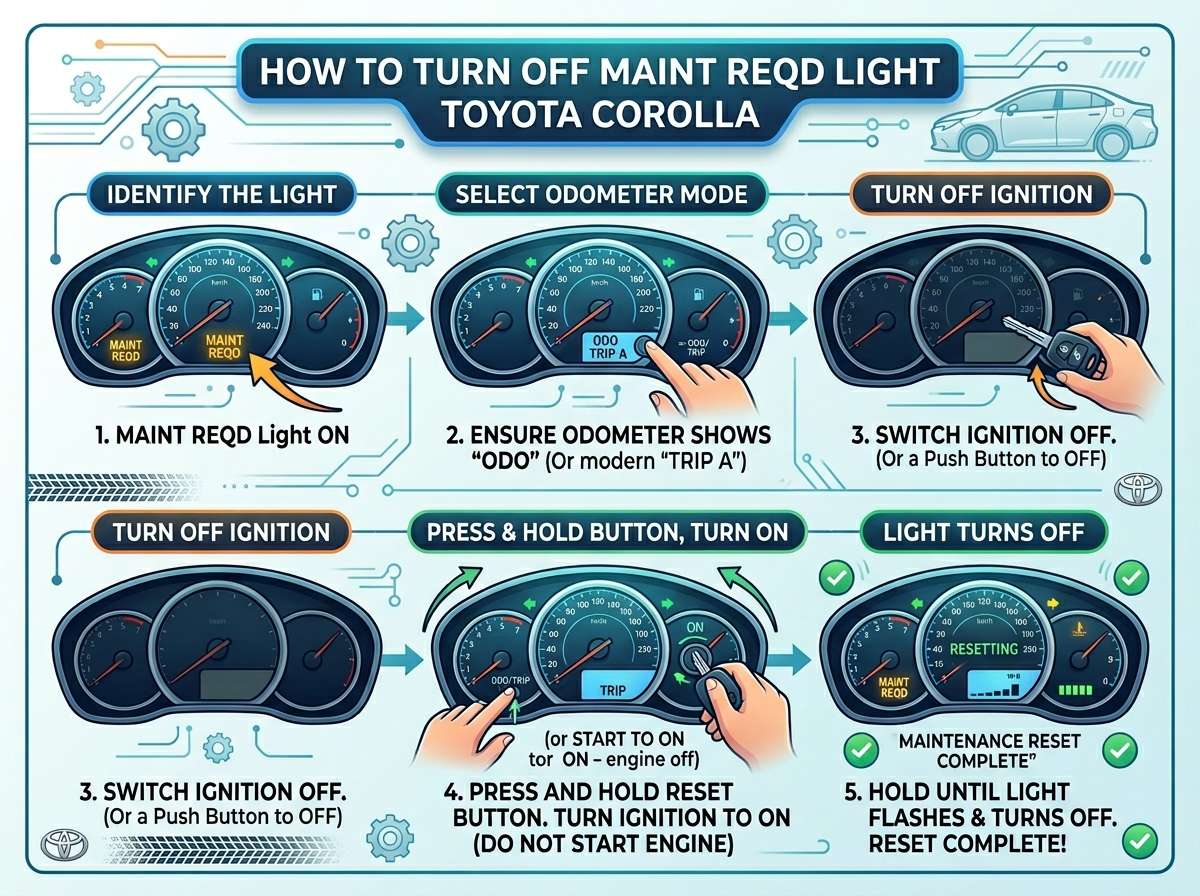
Here’s what you need to do:
Step One: Get Your Key Ready
Grab your car key. You don’t need to start the engine—you just need access to your ignition. Make sure you’re parked safely and that you have a few minutes to spare. This process takes less than five minutes, so it’s quick and painless.
Step Two: Turn On Your Ignition
Push your key into the ignition and turn it to the “On” position. Your dashboard lights should come on, and you should see various indicator lights appear. Don’t start the engine yet—you just want the electrical system active. This is an important distinction because some Corollas behave differently if the engine is running.
Step Three: Locate the Odometer Reset Button
Look at your dashboard near your steering wheel. You should see a small button, often called the trip reset button or odometer reset button. It’s usually located on the instrument cluster stalk, which is the stick that comes out from underneath your steering column. Some models have it on a different location, but this is the most common spot.
Step Four: Press and Hold the Reset Button
Now here comes the magic. While your ignition is in the “On” position, press and hold that reset button. You’re going to hold it down for several seconds. Most Corollas require you to hold it for anywhere from three to five seconds, but some might need longer. Just hold it steady and don’t release too quickly.
Step Five: Watch for the Light to Reset
As you’re holding the button, watch your dashboard. You should see the maintenance light start to flash or flicker. This flickering is exactly what you want to see—it means the system is responding to your input. Keep holding until you see it go away completely or until you’ve held it for about ten seconds.
Step Six: Release and Verify
Release the button and look at your dashboard. The maintenance light should now be gone. Your dashboard should look clean, with no annoying reminders staring at you. Turn off the ignition and give yourself a pat on the back—you did it!
That’s the basic method, and it works for the vast majority of Toyota Corolla owners. However, I should mention that some newer models have touchscreen displays and slightly different procedures, so stick with me if your car has a modern infotainment system.
Resetting the Light on Newer Corollas With Touchscreens
If your Corolla has a larger touchscreen in the center console, the reset process is a bit different. Toyota made some changes to how drivers interact with the maintenance system in these newer vehicles.
For Touchscreen Models:
First, turn your ignition to the “On” position without starting the engine. On your touchscreen, you should see a menu system. Look for an option that says “Settings,” “Vehicle,” or “Maintenance.” Once you find it, tap on it.
Inside that menu, you’re looking for something that says “Reset Maintenance,” “Service Reset,” or “Maint Reqd Reset.” The exact name varies by model. Tap on that option.
A prompt should appear asking if you want to reset the service reminder. Select “Yes” or “Confirm,” depending on what your screen shows. The light should disappear immediately.
One thing to note: some of these newer systems might ask for a PIN code if you have it set up, so make sure you know your PIN before you start. If you don’t have a PIN, the system should let you proceed without one.
The Manual Odometer Reset Method (Alternative)
If the above methods don’t work for you, there’s an alternative that sometimes does the trick. This method involves manipulating the trip odometer display, and it’s a bit more hands-on, but it works on certain Corolla models.
Steps for the Manual Method:
Turn your ignition to the “On” position. Look at your instrument cluster, where your speedometer and odometer are displayed. Some Corollas have a button that lets you cycle between different displays: total mileage, trip mileage, or trip fuel economy. Keep pressing this button until you see your trip odometer displayed.
Once your trip odometer is showing, press and hold the reset button. Hold it for about five to ten seconds. Your maintenance light should start to flash and then disappear. Release the button, and you should be all set.
This method isn’t the most intuitive, which is probably why the first method is more popular, but it absolutely works if you’re running into issues with the standard reset procedure.
What If the Light Comes Back On Immediately?
Sometimes you reset the light, and then it comes back on right away. Don’t panic—this usually means one of two things. First, it might mean your car has actually been driven far enough that the light needs to activate again. This is rare but can happen if your odometer is very close to the threshold.
Second, and more commonly, it means something went wrong with the reset process. You might not have held the button long enough, or your ignition might not have been in the right position. Try the process again from the beginning, and this time, hold the button a bit longer—maybe even ten to fifteen seconds if you have time.
If it keeps coming back on repeatedly, even after multiple reset attempts, you might have an actual maintenance issue that needs attention. In that case, it’s worth having a mechanic look at your vehicle to make sure everything is functioning properly. Sometimes the light is trying to tell you something important, and you don’t want to ignore it.
Can You Just Ignore the Maintenance Light?
Here’s where I need to be honest with you. Yes, you can ignore the light. You can reset it every time it comes on without ever actually doing maintenance on your car. But should you? Absolutely not.
The maintenance light exists for a reason. Your Toyota Corolla has several important maintenance tasks that need to be done regularly. These include oil changes, filter replacements, fluid checks, and inspections. Ignoring these tasks might save you money in the short term, but it will cost you way more in the long term.
Think about it: an oil change costs maybe $30 to $60 depending on where you go. But if you never change your oil and your engine gets damaged as a result, you could be looking at thousands of dollars in repair costs or even a complete engine replacement. That’s not a smart trade-off.
So while you absolutely can reset the light yourself, you should really do the maintenance that prompted the light in the first place. Get your oil changed, check your fluids, look at your filters. It takes an hour at most, and it will keep your Corolla running strong for years and years.
Understanding Your Corolla’s Maintenance Schedule
If you’re going to reset that light, you should probably know what maintenance your Corolla actually needs. Most Toyota Corollas follow a pretty standard maintenance schedule that looks something like this:
Every 5,000 to 10,000 miles, you should get an oil and filter change. Your oil is the lifeblood of your engine, and it gets dirty and breaks down over time. Fresh oil keeps everything lubricated and running smoothly.
Every 15,000 to 30,000 miles, you should rotate your tires. This helps them wear evenly, which extends their life and improves your handling. It’s a simple task that most shops include in their maintenance packages.
Every 30,000 miles or so, you should have your air filter inspected and likely replaced. A clean air filter helps your engine breathe better and run more efficiently.
Every 60,000 miles, you should consider a more comprehensive service that might include transmission fluid checks, coolant system inspections, and brake system reviews.
This is just a general guideline. Your specific Corolla might have slightly different intervals depending on the year and your driving habits. If you drive in very dusty or dirty conditions, you might need more frequent filter changes. If you do a lot of short trips, your oil might need changing more often. Check your owner’s manual for the most accurate information for your specific vehicle.
Tools and Supplies You’ll Need
The good news? You don’t need any special tools or equipment to reset your maintenance light. All you need is your car key and maybe five minutes of your time. That’s it. No expensive diagnostic tools, no trips to the dealer, no technician required.
If you’re actually doing the maintenance that the light is reminding you about, you might want to pick up some supplies. You’ll need the correct oil for your Corolla, a new oil filter, and maybe a new air filter depending on what service you’re doing. You might also want some jack stands if you’re going to get under your car, but honestly, most people take their Corolla to a shop for these services, and that’s perfectly fine.
For the reset process specifically though, you’re good with just your key. That’s the beauty of this procedure—it’s simple, it’s quick, and it’s accessible to anyone.
Common Mistakes People Make When Resetting the Light
Let me tell you about some things that can go wrong if you’re not careful. These are mistakes I’ve seen people make over and over.
First, people often forget to turn their ignition to the “On” position. They think they can reset the light while the car is off, but that doesn’t work. You need electrical power flowing to the dashboard for this to work properly.
Second, people release the button too quickly. They hold it for a second or two and then let go, expecting the light to disappear. Usually, you need to hold it for at least five seconds, sometimes longer. Patience is key here.
Third, people try to reset the light while the engine is running. Most of the time, this won’t work effectively. Turn the ignition to “On,” but don’t start the engine. It’s a subtle difference, but it matters.
Fourth, people confuse the odometer reset button with other buttons on their steering wheel. Your Corolla might have several buttons for various functions. Make sure you’re pressing the right one. If you’re not sure, check your owner’s manual—it will show you exactly which button you need.
Fifth, people reset the light and then immediately turn off the car without letting the system settle. Give your ignition a few seconds in the “On” position after the light resets before turning everything off. This lets the computer confirm the reset.
Resetting vs. Replacing Your Keys
One more thing I should mention: if you’ve lost your car key or if your key doesn’t work properly, you might have trouble with this process. You’ll need a working key to access your ignition and turn it to the “On” position. If your key is damaged or broken, get a replacement key made before you try to reset the light.
Also, some very old Corollas might have mechanical odometers that don’t respond to electronic reset buttons. If your car is particularly old, the procedure might be different, and you might need to consult a professional mechanic or your owner’s manual for specific instructions.
When to See a Mechanic
There are times when that maintenance light is telling you something serious. If your light comes on after you’ve just driven a few hundred miles, or if it’s flashing rather than staying solid, you might have a real problem. A flashing maintenance light can indicate an issue with the system itself or a sensor problem that needs attention.
Also, if you’re hearing strange noises, feeling vibrations, or noticing other symptoms in your car, don’t just reset the light and drive away. Take your Corolla to a mechanic and let them diagnose what’s going on. The light might be a symptom of something bigger.
In general, use your judgment. The maintenance light is a helpful tool, but you’re the driver, and you know your car best. If something feels off, get it checked out.
Taking Care of Your Corolla Long Term
Your Toyota Corolla is built to last. These cars are known for their reliability and longevity. With proper care and regular maintenance, your Corolla can easily go 150,000 miles or more without major issues.
Resetting that maintenance light is just one small part of car ownership. The real key to keeping your Corolla running well is actually doing the maintenance that the light is reminding you about. Change your oil, check your fluids, rotate your tires, and have regular inspections.
Do these things consistently, and you’ll have a car that runs smoothly, performs well, and retains its value. Ignore them, and you’ll end up with expensive repair bills and a car that’s not a pleasure to drive.
Final Thoughts
That maintenance required light isn’t your enemy—it’s actually your friend. Yes, it can be annoying, and yes, you have the power to reset it yourself. But the real value of that light is that it’s pushing you toward taking care of your vehicle.
Now you know exactly how to turn off that light. You have multiple methods to choose from depending on your Corolla model. You understand what the light means, why it exists, and what you should actually do about it. You’re equipped with the knowledge to reset it confidently and to understand the maintenance your car needs.
So go ahead, reset that light if you want to. Just remember that actually maintaining your car is what will keep it running smoothly for years to come. And when that light comes back on in a few months, you’ll know exactly what to do.
Your Corolla is a solid, reliable vehicle. Treat it right, and it will serve you well. That’s the real secret to getting the most out of your Toyota.

Peterson is an automotive enthusiast and auto parts reviewer with a passion for vehicle maintenance, upgrades, and performance. He enjoys researching and testing car parts, tools, and accessories to help drivers make informed buying decisions. Through AutoPartsTalk.com, Peterson shares honest reviews, practical maintenance tips, and expert guides to keep vehicles running safely and efficiently.