How to Reprogram Your Ford Key Fob Push Button Start
Your Ford key fob is one of those items you use every single day without thinking about it. You press a button, your car unlocks, and life goes on. But what happens when your key fob stops working? Or maybe you bought a used Ford and need to program a new remote? The good news is that you don’t need to visit a dealership for this task. You can reprogram your Ford key fob push button start right at home.
Why You Might Need to Reprogram Your Ford Key Fob
There are many reasons why you might find yourself needing to reprogram your remote control. Let’s look at the most common situations that car owners face.
Your key fob batteries might be dead. This is the most basic reason. Sometimes it’s not broken. It just needs new batteries. Other times, your remote got wet or suffered physical damage. The internal circuits might be damaged beyond repair, but the hardware itself is fine.
You just bought a used Ford vehicle. Previous owners probably had their own remotes paired to the car. When you get a new-to-you car, the old remotes might still work. You need to erase them and add your own key fob to the system.
Someone lost their key fob. If a key fob goes missing, you can’t just leave it out there. A stranger could potentially use it. The smart move is to remove that remote from your vehicle’s system so it won’t work anymore.
Your key fob buttons are stuck or not responding properly. Sometimes the buttons get jammed or sticky. Instead of replacing the whole thing, reprogramming can sometimes fix the issue.
You have a spare key fob that you want to activate. Many Ford owners don’t realize that their spare remotes aren’t always active. You need to follow the proper programming steps to make them work.
Understanding Your Ford Key Fob System
Before you start the reprogramming process, it helps to know what you’re actually working with. Ford uses a pretty straightforward system for their remotes and key fobs.
Your Ford key fob communicates with your vehicle using radio frequency signals. When you press a button, it sends a unique code to your car. The receiver in your car recognizes this code and performs the action. This could be locking doors, unlocking doors, or opening the trunk.
The push button start system in modern Fords works a little differently. When you sit in your car with the key fob, the vehicle recognizes it automatically. You don’t have to turn a key. You just press the brake pedal and push the button labeled “Start.” The car’s computer checks for the fob’s signal and starts the engine if everything checks out.
Ford made the reprogramming process easy for car owners. You don’t need special equipment. You don’t need computer equipment. You don’t need to go to the dealership. You just need the right steps and a little patience.
The system stores information about which key fobs are authorized to work with your specific vehicle. When you reprogram a remote, you’re adding a new code to that list. Or you’re removing old codes that are no longer needed.
What You’ll Need Before Starting
Let’s go over what you need to have ready before you begin the reprogramming process.
Your key fobs. You need at least one working key fob. If you’re adding a spare, have it ready. If you’re trying to reprogram a broken one, have a working one available first. The working one helps you access your vehicle and start the programming sequence.
Your Ford vehicle. Obviously, you need the car itself. The reprogramming happens through your vehicle’s computer system.
Access to your car’s interior. You need to sit in the driver’s seat and reach the steering column, dashboard, and ignition.
New batteries. If your key fob is struggling, grab a fresh set of batteries before you start. Most Ford remotes use two or three-volt batteries. Check your specific model to be sure.
Patience. This isn’t a complicated process, but it does require focus. Rushing through the steps means you’ll probably mess up the sequence.
A pen and paper. Sometimes it helps to jot down the steps as you go. This is especially true if you’re reprogramming multiple key fobs.
Your vehicle documentation. While not always necessary, having your owner’s manual handy can help. It has specific information about your Ford model.
The Basic Ford Key Fob Reprogramming Method
Now let’s get into the actual reprogramming steps. This method works for most Ford vehicles. Some newer models might have slight variations, but the basic process stays the same.
Step One: Get into Your Car
Sit in the driver’s seat. Make sure all the doors are closed. You’re going to need access to your ignition and steering wheel. If anyone else is in the car, let them know what you’re doing so they don’t interfere.
Step Two: Locate Your Ignition
Your key fob reprogramming starts at the ignition. Look at the right side of your steering column. Most Fords have the ignition switch here. Some older models might be slightly different, but it’s always near the steering column.
Step Three: Start the Cycle
This is where the actual programming begins. You’ll turn the key from OFF to ON. Don’t start the engine. Just turn it to the ON position. You should see your dashboard lights come on. Then turn it back to OFF. Count to one second. Then turn it back to ON again. Finally, turn it back to OFF.
This sequence needs to happen fairly quickly. You’re not waiting long between turns. The whole cycle should take about five to ten seconds total. You’re doing ON, OFF, ON, OFF. That’s the pattern.
Step Four: Listen for the Response
After you complete the ON-OFF-ON-OFF cycle, your car will signal that it’s ready to accept new key fob codes. You’ll hear a chime sound. This chime is your signal that the programming mode is now active. Some Ford models flash the lights instead of chiming. Either way, your vehicle is ready to learn new remotes.
Step Five: Program Your First Key Fob
Now take your working key fob. Hold it near the steering wheel. Press any button on the remote. It doesn’t matter which button you use. Lock, unlock, trunk, panic button, they all work. Just press one button and hold it down.
Keep holding that button for about two to three seconds. Your car will respond again. You might hear another chime or see the lights flash again. This signals that your car has accepted this key fob.
Step Six: Program Additional Key Fobs
If you have other remotes you want to program, repeat step five. You have about four seconds between each key fob. So finish with the first remote, then quickly grab your second remote and press a button the same way.
You can program up to four key fobs in a single programming session. Many Ford owners don’t know this. If you have more than four remotes, you’ll need to cycle through the programming mode again.
Step Seven: Exit Programming Mode
Once you’ve programmed all your key fobs, you need to exit the programming mode. Simply turn your ignition back to ON one more time. Then turn it to OFF. Your car will chime or flash to let you know that programming mode is closed.
Step Eight: Test Your Remotes
Now comes the fun part. Test all your newly programmed key fobs. Stand outside your Ford at a normal distance. Press the lock button. Your car should lock. Press unlock. Your car should unlock. Press the trunk button if your remote has one.
If a remote doesn’t work, turn your ignition back to ON and OFF again. Wait about three seconds and repeat the programming sequence for that specific remote.
Reprogramming a Ford Key Fob with Push Button Start
The push button start system works slightly differently than traditional key fobs. The process for programming is almost the same, but there are a few extra details to know.
With a push button start system, your Ford needs to recognize your key fob when you’re inside the vehicle. The remote doesn’t just work the locks. It also needs to interact with your start button. The good news is that the reprogramming process covers both functions at the same time.
When you follow the steps above with a push button start car, you’re programming the entire system. The remote will control locks, trunk, and it will authorize your push button start. Your car will recognize the fob and let you press that big button on the dashboard to start the engine.
If you’ve lost your original push button start fob, don’t panic. You can program a spare or a replacement remote using the same method. Just make sure you have at least one working key fob to access your vehicle during the process.
Advanced Programming Methods for Newer Ford Models
Some newer Ford vehicles have different programming methods. They use a more sophisticated system. If you have a Ford made in the last few years, your vehicle might use the following process instead.
Using the Self-Programming Feature
Sit in your car. Put your first key fob in the ignition switch. Turn it to the ON position. Turn it back to OFF. Remove it.
Put your second key fob in the ignition switch. Turn it to the ON position. Turn it back to OFF. Remove it.
Repeat this process with all the key fobs you want to program. Your car will program each one as you insert and turn them.
Using the Integrated Keyless Remote System
Some Fords use an integrated system. You access the settings through the vehicle menu. Use the buttons on your steering wheel or a touch screen. Navigate to the settings or programming menu. Follow the on-screen directions. This method varies by model, so check your owner’s manual for exact steps.
When Your Push Button Start System Won’t Recognize the Key Fob
Sometimes you reprogram everything correctly, but the push button won’t work. Here are some common reasons why.
The battery in your key fob might still be dead or dying. Even after programming, a weak battery won’t send a strong enough signal. The car won‘t recognize it. Replace the battery and try again.
Your push button start system might have a low battery in the fob detection system itself. This is rare, but it happens. If multiple remotes aren’t working, have your Ford checked by a technician.
The receiver in your car might be faulty. This isn’t something you can fix at home. You’d need to visit a service center.
Your car’s security system might have locked out all remote access. This can happen if someone tries to program too many remotes in rapid succession. Turn off your car, wait about thirty minutes, and try again.
Troubleshooting Your Ford Remote Control Problems
Let’s say you followed all the steps, but something didn’t work. Don’t give up yet. Here are solutions to the most common problems.
The Car Won’t Enter Programming Mode
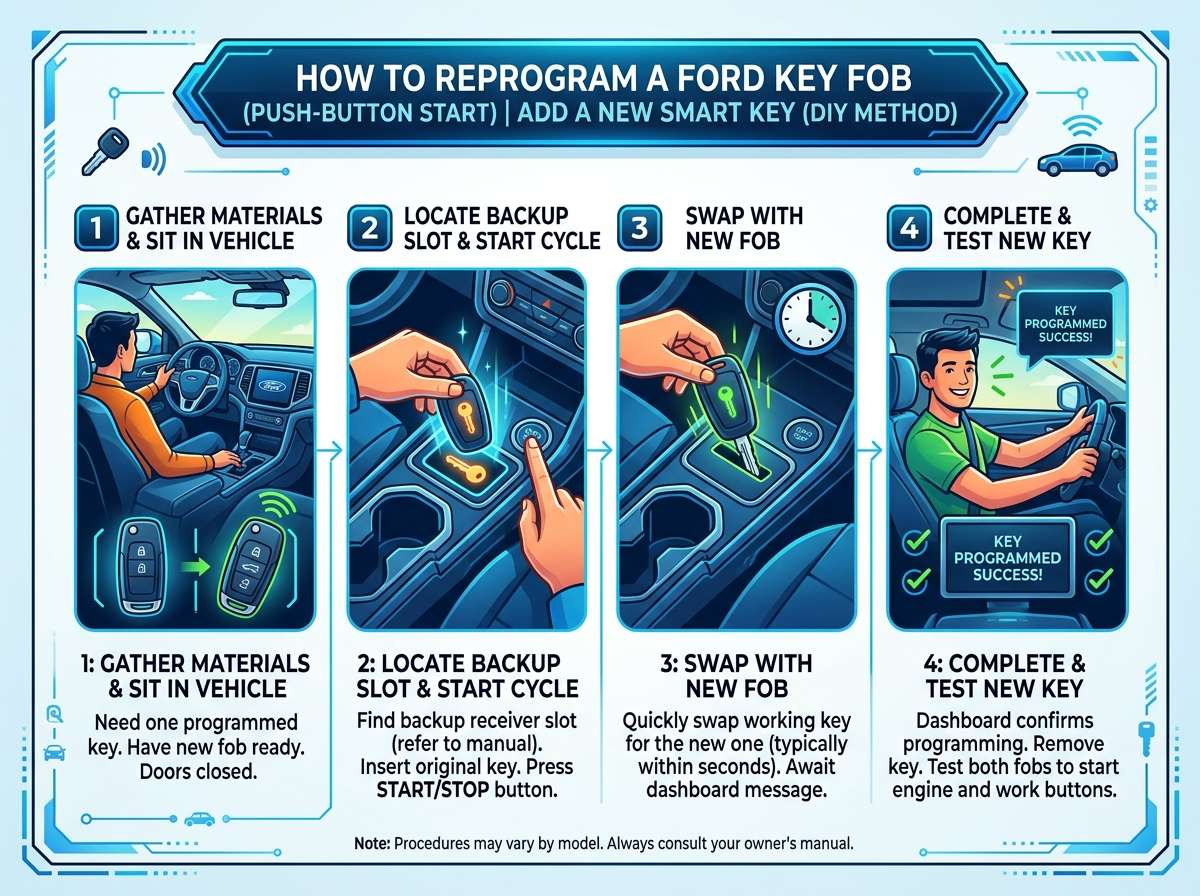
Your ignition might be a different style than expected. Some Ford models use a push button ignition instead of a traditional key slot. If your car has push button start, you need to use the key fob in the ignition slot for programming. Look for a small slot near the steering column. This is where you insert your key fob into the mechanical slot to do programming.
One Remote Works But Others Don’t
You might have run out of programming space. Ford vehicles can typically program up to four remotes. If you’re trying to program a fifth one, you need to erase an old remote first. Or you need to start the programming sequence fresh and skip programming one of the previous remotes.
The Buttons Are Dead But Showing Lights
Your battery might be backwards. Pop open the battery case and check. The positive and negative sides need to face the right direction. If they’re backwards, the lights might work but the remote won’t send proper signals to your car.
Nothing Happened After Programming
Wait a few minutes. Sometimes the car needs time to process the new programming. Don’t immediately grab your key fob and run outside to test it. Give the system about two to three minutes. Then test the remote.
Erasing Old Key Fobs From Your Vehicle
When you buy a used Ford, the previous owner’s remotes might still work. You should erase them for security reasons. Here’s how.
Get into programming mode using the same steps we covered before. Turn the key ON, OFF, ON, OFF. Wait for the chime or light signal.
Press a button on the old remote that you want to erase. Hold it for several seconds. About ten seconds is good. Your car will signal when it’s erased. You’ll hear a chime or see lights flash differently.
Repeat this for each remote you want to remove from the system.
When you’re done erasing, program your own new remotes using the normal method.
This is one of the most important security steps. Never skip it when you buy a used car.
Tips and Tricks From Ford Owners
Real people who’ve done this before have some great advice to share.
Keep Your Spare Remote Charged
Program your spare remote even if you don’t plan to use it right away. Having a working backup saves you in an emergency. You don’t want to be stranded because your only working remote stopped working.
Write Down Your Steps
Make a quick note of which remotes you’re programming and the order. If something goes wrong, you’ll remember exactly what you did.
Don’t Rush the Sequence
The timing matters, especially in the initial ON-OFF-ON-OFF cycle. Don’t try to speed through it. Take your time and do it slowly.
Test Everything Before You Leave
Program your remotes, then sit in your car for five minutes. Test the locks, trunk, and push button start before you drive away. You don’t want to find out the programming didn’t work when you’re in a parking lot somewhere.
Know Your Ford Model Number
Different Ford models have slight variations. If you get stuck, knowing your exact model helps you find specific instructions online. Check your registration or owner’s manual.
YouTube Is Your Friend
Lots of Ford owners have posted videos of themselves doing this. Watching someone do it can clarify the steps much better than reading about it. Search for your specific Ford model and “reprogram key fob.”
When to Call a Professional
Sometimes you really do need a professional. Here’s when you should give up on the DIY route.
If you’ve tried the programming steps three or more times and nothing works, call a dealership. There might be a deeper issue with your car’s computer system.
If your push button start system won’t respond even after programming, get it checked out. The receiver might be broken.
If you’ve lost all your key fobs and only have the valet key, you’ll need a professional. This requires special equipment to restore.
If your car was stolen and recovered, the security system might be locked down. A professional needs to reset it.
The dealership can reprogram remotes for you, but it costs money. A basic programming usually runs about fifty to one hundred dollars at a service center. Compared to that, the DIY method is free.
Cost Comparison: DIY vs. Professional Programming
Let’s be real about the money situation.
DIY Method
Cost of new batteries: Five to ten dollars if you need them Cost of tools: Zero if you have a pen and paper Cost of your time: About twenty to thirty minutes Total cost: Five to ten dollars
Professional Dealership Method
Cost of programming: Fifty to one hundred fifty dollars Cost of batteries if needed: They’ll probably charge extra Cost of your time: Driving there and waiting Total cost: Seventy to two hundred dollars
The DIY method wins financially. You save serious money by doing it yourself at home.
Ford Keyless Remote Security Basics
Programming your remote is one thing. Using it safely is another. Here are some security tips.
Never leave your key fob in plain sight in your car. Thieves can grab it. Some thieves have special equipment that can boost a remote’s signal from a distance. Don’t tempt them by leaving it on your seat.
Keep your spare remotes locked up at home. Don’t leave them in your car’s glove box. If someone steals your car, they shouldn’t get the backup remote.
If you lose a key fob, erase it from your car immediately using the method we talked about. Don’t wait. Do it right away.
Change your habits if you think someone has copied your remote. Move your car to different parking spots. Your car should be in different locations to help identify strange activity.
Consider installing an alarm system. Many Ford vehicles can have alarms added. They make unauthorized starting attempts less likely.
Common Questions About Ford Key Fob Reprogramming
Let me answer some questions that come up again and again.
Can I reprogram my key fob if I’ve lost the car keys?
You need at least one working method to access your car. You can use a spare key fob. You can use a mechanical key if your car has one. If you have nothing, you’re stuck and need a professional.
Will reprogramming erase my other settings?
No. Programming key fobs doesn’t affect your radio stations, seat positions, or other saved settings. It only changes which remotes can control your car.
Can I program a key fob from a different Ford model?
No. Ford remotes are specific to each vehicle. A remote from a different model won’t work on your car, even after programming. It’s a security feature.
How many times can I reprogram the same remote?
Unlimited times. You can reprogram a single remote over and over. There’s no limit to how many times you can do it.
Do I need to go to the Ford dealership?
Not for basic programming. You can do it yourself using the steps in this guide. You only need a dealership if the DIY method fails.
What if my car has a different ignition system?
Newer Fords with push button ignition have a different method. You’ll insert your key fob into the ignition slot instead of using a traditional key. The steps are similar, just slightly different. Check your owner’s manual for your specific system.
Can I program a key fob that doesn’t have a battery?
No. The remote needs a working battery to send signals to your car. Put in new batteries first.
Will my car tell me the programming worked?
Yes. Your car will chime or flash lights when programming is successful. Pay attention to these signals. They tell you everything is working right.
Prevention: Keeping Your Key Fob Working Longer
The best approach is prevention. Keep your remote in good shape so you avoid needing to reprogram it in the first place.
Replace batteries every few years even if they still work. Old batteries lose power gradually. You won’t notice until one day your remote quits.
Keep your remote away from water. Don’t leave it in pockets when you wash clothes. Don’t use it in the rain for long periods. Water damages the internal circuits.
Don’t drop your remote. The internal components can shift if you slam it on hard surfaces. Handle it like you handle your phone.
Keep your remote away from extreme heat and cold. Don’t leave it in your car in the hot sun. Don’t expose it to freezing temperatures for long periods.
Clean the battery contacts every year. Pop open the battery compartment and wipe the metal contacts with a dry cloth. Corrosion on the contacts prevents good electrical connections.
Store spare remotes in a cool, dry place. Don’t throw them in a drawer with other stuff. Keep them protected.
Final Thoughts on Ford Key Fob Reprogramming
Reprogramming your Ford key fob push button start system is easier than you probably thought. You don’t need special tools. You don’t need a computer. You don’t need to visit a dealership. You just need to follow the steps carefully and give yourself enough time.
The biggest takeaway is that you have power here. Your vehicle’s system is designed for you to manage this yourself. Ford made the process simple on purpose. They know that remote issues happen. They built in a way for regular car owners to fix it.
Start with one remote. Get it working perfectly. Then move on to programming additional remotes if you have them. Test everything before you drive away from your programming session. And don’t forget to erase old remotes if you just bought a used Ford.
This skill will serve you well. You’ll save money and time by handling it yourself. Plus, you’ll feel pretty accomplished when that car recognizes your remote and unlocks on the first try. That’s the power of knowing how to reprogram your Ford key fob. You’ve got this.

Peterson is an automotive enthusiast and auto parts reviewer with a passion for vehicle maintenance, upgrades, and performance. He enjoys researching and testing car parts, tools, and accessories to help drivers make informed buying decisions. Through AutoPartsTalk.com, Peterson shares honest reviews, practical maintenance tips, and expert guides to keep vehicles running safely and efficiently.