How to Remove Maintenance Light on Toyota Corolla?
So your Toyota Corolla’s maintenance light just came on. You got the oil change done. The car feels fine. But that little light is still sitting there, staring at you from the dashboard.
Don’t worry. You are not alone. This happens to a lot of Corolla owners. The good news? You don’t need to go back to the dealership just to turn it off. You can do it yourself in a few minutes, right at home.
This guide walks you through exactly how to reset the maintenance light on your Toyota Corolla. No special tools. No mechanic needed.
What Is the Maintenance Light on a Toyota Corolla?
Before we get into the reset steps, let’s talk about what this light actually means.
The maintenance light — sometimes called the “MAINT REQD” light — is a reminder system built into your car. It is not the same as the check engine light. The check engine light signals a real problem. The maintenance light is just a timer.
It tracks how many miles you have driven since the last oil change. Once you hit a set number of miles, it turns on to remind you it’s time for service. Think of it like an alarm clock. After you snooze it (or in this case, reset it), it goes quiet again.
If you already got your oil changed and the light is still on, it simply means the shop forgot to reset it. Or you did the oil change yourself and skipped the reset step. Either way, the fix is simple.
Is It Safe to Reset the Light Without Doing Any Service?
Short answer: only reset the light after you have actually done the oil change or maintenance work.
The maintenance required light exists to help you. It keeps track of your service intervals so you don’t forget. If you reset it without doing the oil change, you are just ignoring the reminder. Your car won’t explode or anything, but you might end up skipping an oil change without realizing it.
So do the service first. Then reset the light.
What You Need to Reset the Maintenance Light
Nothing special. You just need:
- Your Toyota Corolla (with the key or smart key)
- About 3 to 5 minutes of your time
That’s it. No OBD-II scanner. No tools. Just you and your car.
How to Reset the Maintenance Light on Toyota Corolla (Most Common Method)
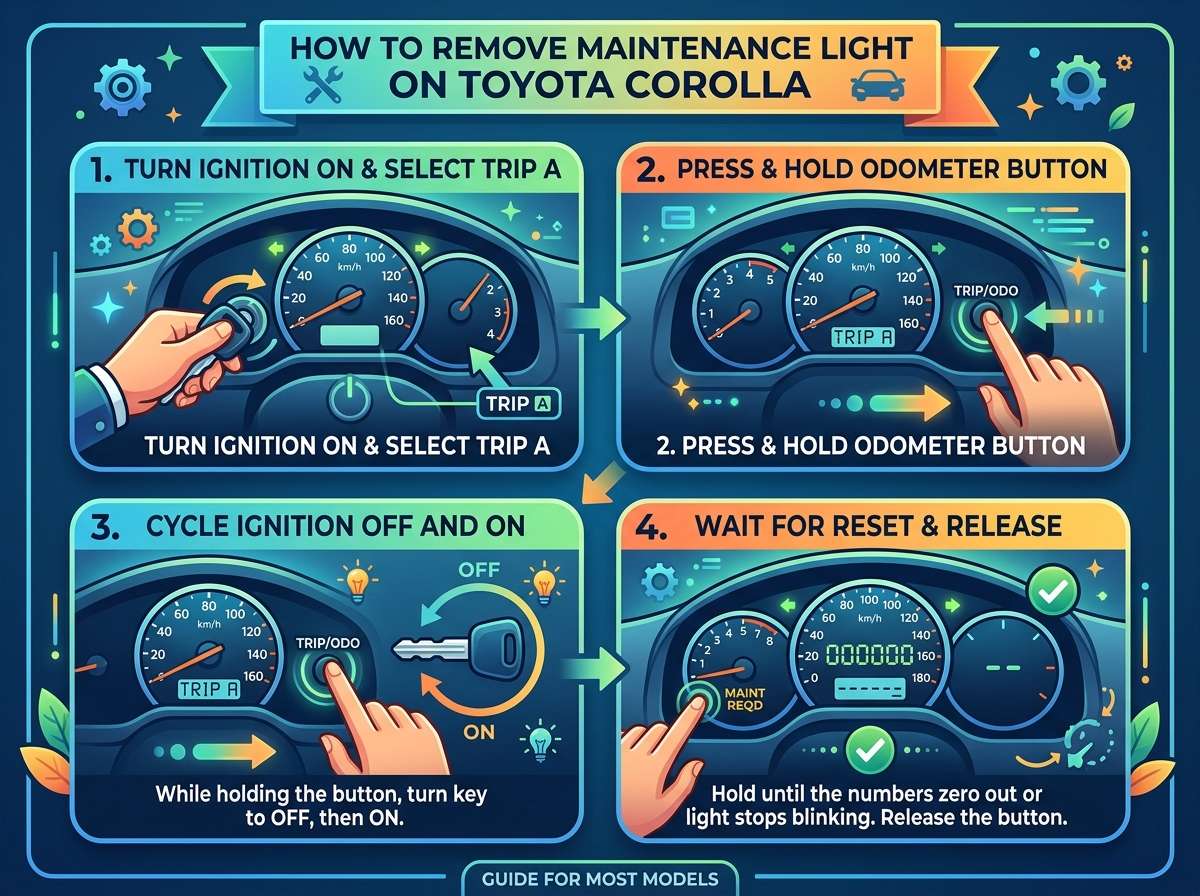
This method works on most Toyota Corolla models. It uses the trip meter reset button on the instrument cluster. Here’s how to do it:
Step 1: Turn the Car Off
Make sure the car is fully off. Not in accessory mode. Completely off.
Step 2: Press and Hold the Trip Meter Reset Button
Find the trip meter button. It’s usually a small button on your dashboard, right near the speedometer. Press and hold it down.
Step 3: Turn the Ignition to the “On” Position
While still holding the trip meter button, turn your key to the “On” position. This is the position just before you start the engine. The dashboard lights should come on, but the engine should not start.
If you have a push-button start, press the start button once without pressing the brake pedal. The car will go into accessory mode. Press it a second time to go to the “On” position (dashboard fully lit, engine still off).
Step 4: Hold the Button Until the Light Resets
Keep holding the trip meter button. You will see the maintenance light start to blink or flash. Keep holding. After about 5 to 10 seconds, the light will turn off or show dashes on the odometer display. That means the reset worked.
Step 5: Release the Button and Start the Car
Let go of the trip meter button. Turn the key back to the off position. Then start the car normally. The maintenance light should be gone.
If it’s still there, repeat the process. Sometimes it takes two tries.
How to Reset the Maintenance Light Using the Multi-Information Display (MID)
Some Toyota Corolla models come with a multi-information display. This is a small screen between the speedometer and tachometer. It shows trip info, fuel economy, and other data.
If your Corolla has this screen, the reset process is a little different.
Step 1: Turn the Car On (Without Starting the Engine)
Turn the key to the “On” position or press the start button once (without the brake pedal) to activate the dash without starting the engine.
Step 2: Navigate to the Maintenance Screen
Use the steering wheel controls or the buttons near the display to scroll through the menu. Look for the oil change reminder or maintenance info screen.
Step 3: Select the Reset Option
Once you find the oil change screen, press and hold the “OK” button or the select button. The display will ask you to confirm the reset.
Step 4: Confirm and Reset
Confirm the reset. The display will show the counter going back to zero. The maintenance light will turn off.
Step 5: Start the Car Normally
Turn the car off, then start it again. The maintenance light should be gone.
How to Reset the Maintenance Light Using an OBD-II Scanner
You don’t need a scanner to reset this light. But if you already have one at home, you can use it too.
An OBD-II scanner plugs into the port under your dashboard (usually on the driver’s side, below the steering wheel). You can find this port easily — it’s a trapezoid-shaped connector.
Here’s how to use it:
Step 1: Plug In the Scanner
Turn the car on (engine off is fine). Plug the OBD-II scanner into the port.
Step 2: Navigate to Oil Reset or Maintenance Reset
Most scanners have an “Oil Reset” or “Service Reset” option in the main menu. Select it.
Step 3: Follow the On-Screen Prompts
The scanner will walk you through the reset. Confirm when asked. The maintenance required light will turn off.
Step 4: Unplug the Scanner and Start the Car
Remove the scanner. Start the car normally. The light should be gone.
This method is great if the manual reset (trip button method) isn’t working for you.
The Maintenance Light Came Back On. What Now?
If the light comes back on right after you reset it, there are a few possible reasons:
You reset it too soon. Some Corollas only allow the reset when the trip meter is at a certain point. Try doing the reset right after an oil change, not days later.
The reset didn’t fully complete. Go through the steps again slowly. Make sure you hold the button long enough.
Your mileage interval is very short. If you drive a lot, the light might come back on faster than you expect. That’s normal. Just reset it again after the next oil change.
There’s an actual service issue. If the light comes on very quickly after a reset, check when you last had an oil change. If it’s been a long time, get the oil changed first.
Toyota Corolla Maintenance Light vs. Check Engine Light
A lot of people get these two confused. Let’s clear it up.
The maintenance required light (MAINT REQD) is a simple mileage-based timer. It is orange or yellow and says “MAINT REQD.” It does not mean your car has a problem. It just means it’s time for routine service like an oil change, tire rotation, or filter replacement.
The check engine light looks like a little engine icon. This one is different. It means your car’s computer found a fault somewhere. It could be something minor (like a loose gas cap) or something more serious (like a sensor failure). You should not ignore the check engine light.
If both lights are on at the same time, get the check engine light checked first. Don’t just reset both and hope for the best.
How Often Should You Change the Oil on a Toyota Corolla?
The standard recommendation for most modern Corollas is every 5,000 miles if you use conventional oil. If you use full synthetic oil, you can often go up to 10,000 miles between changes.
Check your owner’s manual for the exact interval for your specific engine type. Driving conditions also matter. If you do a lot of short trips, stop-and-go traffic, or extreme weather driving, you may need to change the oil more often.
The maintenance light is usually set to turn on every 5,000 miles by default. You can have a Toyota service center adjust this interval if needed.
Other Maintenance Tasks to Do When You Reset the Light
Since you’re already in maintenance mode (no pun intended), here’s a quick checklist of other things to look at when you reset the oil change reminder:
Tire rotation — Most shops recommend rotating your tires every oil change. It helps them wear evenly and last longer.
Air filter check — A dirty engine air filter hurts fuel economy. Check it every other oil change at minimum.
Cabin air filter — This one filters the air inside your car. It’s easy to replace and should be swapped out regularly.
Wiper blades — If they are streaking or skipping, it’s time to replace them.
Brake inspection — Every few oil changes, have someone take a quick look at your brake pads and rotors.
Fluid levels — Check coolant, power steering fluid, brake fluid, and transmission fluid while you are at it.
Taking care of these small things keeps your Corolla running strong and avoids bigger (and more expensive) problems later.
Tips to Avoid Getting Confused by Dashboard Lights
Dashboard lights can feel overwhelming. Here’s a simple system to stay on top of them:
Keep a small notebook in your glovebox. Write down the date and mileage every time you get an oil change or service. Then you always know when the next one is due.
Take a photo of your dashboard. When a new light comes on, search what it means before you panic. Not every light is an emergency.
Read the warning lights section of your owner’s manual. It’s usually near the back. It has pictures of every light and what each one means.
Don’t ignore lights for long. Even the maintenance required light. Skipping oil changes is one of the fastest ways to wear out an engine.
Can You Drive with the Maintenance Light On?
Yes, you can. The maintenance required light does not mean stop the car right now. It’s just a reminder.
But don’t let it stay on for weeks or months without doing something about it. If it’s on because you already got an oil change, just reset it using the steps above. If it’s on because you haven’t had an oil change yet, go get one soon.
Think of it like a text message you haven’t replied to. You can wait a little while, but eventually you need to deal with it.
Frequently Asked Questions
Will the maintenance light reset itself? No. You have to reset it manually. It will not go away on its own, even after an oil change.
Does resetting the light erase anything from my car’s computer? No. The maintenance light reset only clears the oil change reminder counter. It does not affect your car’s stored data, trouble codes, or any other systems.
My car doesn’t have a trip meter button. What do I do? Some newer Corolla models use the steering wheel controls and the multi-information display to reset the light. Try the MID method described earlier in this guide.
How do I know which method to use for my specific Corolla? Check your owner’s manual. It will have the exact reset steps for your model. You can also search online using your specific model and trim level.
Can I reset the maintenance light with a dead battery? No. If your battery is dead, you need to charge or replace it first. After a battery replacement, you may also need to reset the maintenance light since the car’s systems restart from scratch.
Final Thoughts
Resetting the maintenance light on your Toyota Corolla is one of the easiest things you can do as a car owner. It takes a few minutes, costs nothing, and you don’t need any special equipment.
The most common method — press and hold the trip meter button while turning the ignition on — works on most Corolla models. If that doesn’t work for you, try the multi-information display method or use an OBD-II scanner.
Just remember: always do the actual oil change or maintenance first. The light is there to help you take care of your car. Reset it after the service is done, not before.
Your Corolla is a reliable car. Keep up with the basic maintenance, reset the light when needed, and it will keep going strong for years and years.
Got questions? Drop them in the comments. And if this guide helped you, share it with a friend who’s staring at the same blinking light on their dashboard.

Peterson is an automotive enthusiast and auto parts reviewer with a passion for vehicle maintenance, upgrades, and performance. He enjoys researching and testing car parts, tools, and accessories to help drivers make informed buying decisions. Through AutoPartsTalk.com, Peterson shares honest reviews, practical maintenance tips, and expert guides to keep vehicles running safely and efficiently.